Accommodation and Dietary Requirements - Article
Summary
Accommodation and diet helps delivery teams prepare suitable visa, accommodation, transport, and catering support for people attending a Training Activity. It gives participants a structured way to provide the practical information needed for their attendance, including when someone else enrolled them. Because responses may contain sensitive personal information, collect only what is necessary and ensure that access, sharing, export, and retention follow the organization’s privacy practices.
In this article you will learn:
- What Accommodation and diet is designed to collect
- Which predefined assistance options can be enabled
- How hotel and transfer assistance depend on each other
- Where participants provide their booking preferences
- How free simple enrollment differs from checkout
- What happens when a manager enrolls another person
- Where saved preferences are delivered and reported
- How to operate the feature responsibly and troubleshoot common issues
What Accommodation and diet helps you achieve
Use Accommodation and diet when a Training Activity requires the delivery team to prepare practical services around individual participants.
Depending on the options enabled for the activity, participants can request:
- Assistance with a visa application
- Assistance with booking a hotel
- Transfer support to or from the activity location
- Support for dietary requirements
These are requests for assistance and booking preferences. Selecting an option does not itself:
- Issue a visa
- Reserve or pay for a hotel
- Book transport
- Confirm that a dietary request can be met
- Notify every external supplier
- Add an Additional Product or charge
Define who reviews each request, what deadlines apply, how services and costs are confirmed, and how the participant is told what can actually be provided.
Understand the predefined booking questions
Accommodation and diet is not a form builder. Administrators select from a predefined set of assistance options at activity level, and Eurekos displays the corresponding questions during enrollment.
The administrator cannot add, remove, reorder, or redesign the individual fields from the Training Activity. The displayed wording and translations can be maintained through the platform’s normal language and taxonomy configuration, but this does not create a different question structure for each activity.
If the business process requires additional or activity-specific questions, use an appropriate questionnaire or another approved intake process and test how it fits into enrollment, reporting, and privacy handling.
Confirm feature availability
Accommodation and diet is an activity-level feature used during self-enrollment. It is not available when Storefront is disabled in General settings.
Before enabling it, confirm:
- Storefront and the intended self-enrollment route are active.
- The activity genuinely needs participant-specific booking information.
- Every selected request type has an operational owner.
- Commerce Automation has a monitored new-enrollment email receiver.
- Authorized administrators know how to obtain Signup details.
- Privacy, access, sharing, and retention rules are approved.
- Registration closes early enough for the team to act on the requests.
Do not enable every option simply because it is available. Irrelevant questions add friction and collect information that the delivery team may not need.
Configure Accommodation and diet
- Open Course Administration → Activities.
- Create or edit the Training Activity.
- Enable Self enrollment and configure its complete Storefront route.
- Add or enable Accommodation and diet at activity level.
- Select only the assistance options required for this delivery.
- Save the activity.
- Explain scope, deadlines, costs, and confirmation in the Activity Description.
- Test every enrollment route that the intended audience will use.
- Verify the new-enrollment email and Signup details output.
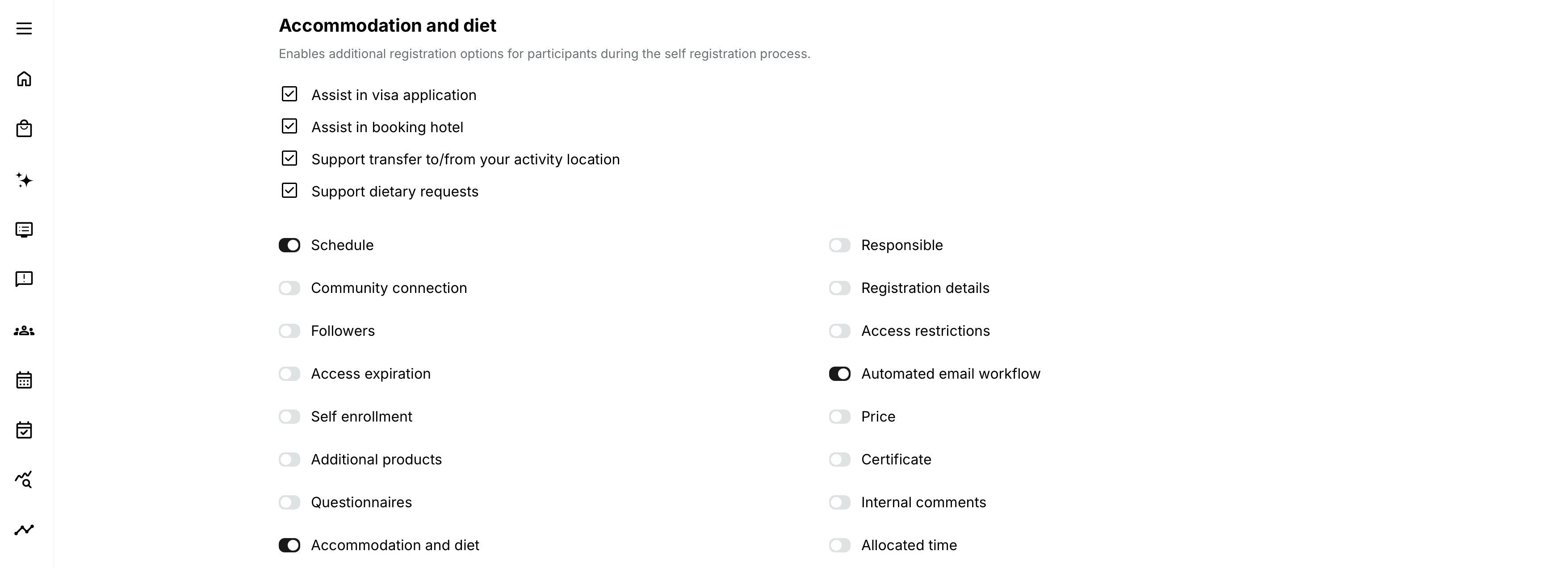
The activity-level options are:
| Option | Purpose | Important behavior |
|---|---|---|
| Assist in visa application | Collect information needed to help the participant with a visa process. | The participant can be asked for travel dates, passport details, passport expiration, and issuing country. Treat this information as sensitive. |
| Assist in booking hotel | Ask whether the participant wants help arranging accommodation. | When selected by the participant, the popup can display hotel-related details such as room occupancy and flight information. |
| Support transfer to/from your activity location | Collect transfer preferences connected to the participant’s accommodation and travel arrangements. | This activity-level option is shown only after Assist in booking hotel has been enabled. It cannot be configured as an independent option. |
| Support dietary requests | Let the participant provide information needed for catering. | The participant can select the option and enter the relevant dietary request. Ask for the required accommodation, not an unnecessary medical history. |
Explain the service on the Activity Description
The participant should understand what will happen before selecting Enroll. Explain:
- Which forms of assistance may be requested
- Whether a request remains subject to review and confirmation
- The deadline for submitting information
- Which costs, if any, the provider covers
- Who will contact the participant
- Where the applicable privacy information is available
Avoid promising that accommodation, transport, or another service is included when the feature only records a request for assistance.
Understand where the questions appear
The presentation depends on the activity price, enrollment route, and platform Commerce configuration.
| Enrollment context | Where booking preferences are entered | What to verify |
|---|---|---|
| Free activity with Simple enrollment flow for free courses enabled | A popup opens after the participant selects Enroll on the Activity Description. | Confirm that the enabled sections and their conditional fields appear before enrollment is completed. |
| Free activity with simple enrollment disabled | The questions appear during checkout. | Test the complete free checkout and resulting signup. |
| Paid activity | The questions appear during checkout. | Confirm that preferences are retained through successful payment and are not treated as confirmed services after a failed or abandoned payment. |
| Manager or Immediate Manager enrolls another person | The participant receives an Enter your booking preferences email and follows its link to a dedicated page. | Confirm that the target participant, rather than the manager, can provide the information before the operational deadline. |
The questions are part of the enrollment journey, but they collect operational information rather than creating a separate service order.
Free simple-enrollment flow
When the activity is free and Simple enrollment flow for free courses is enabled in Commerce settings:
- The authenticated participant selects Enroll.
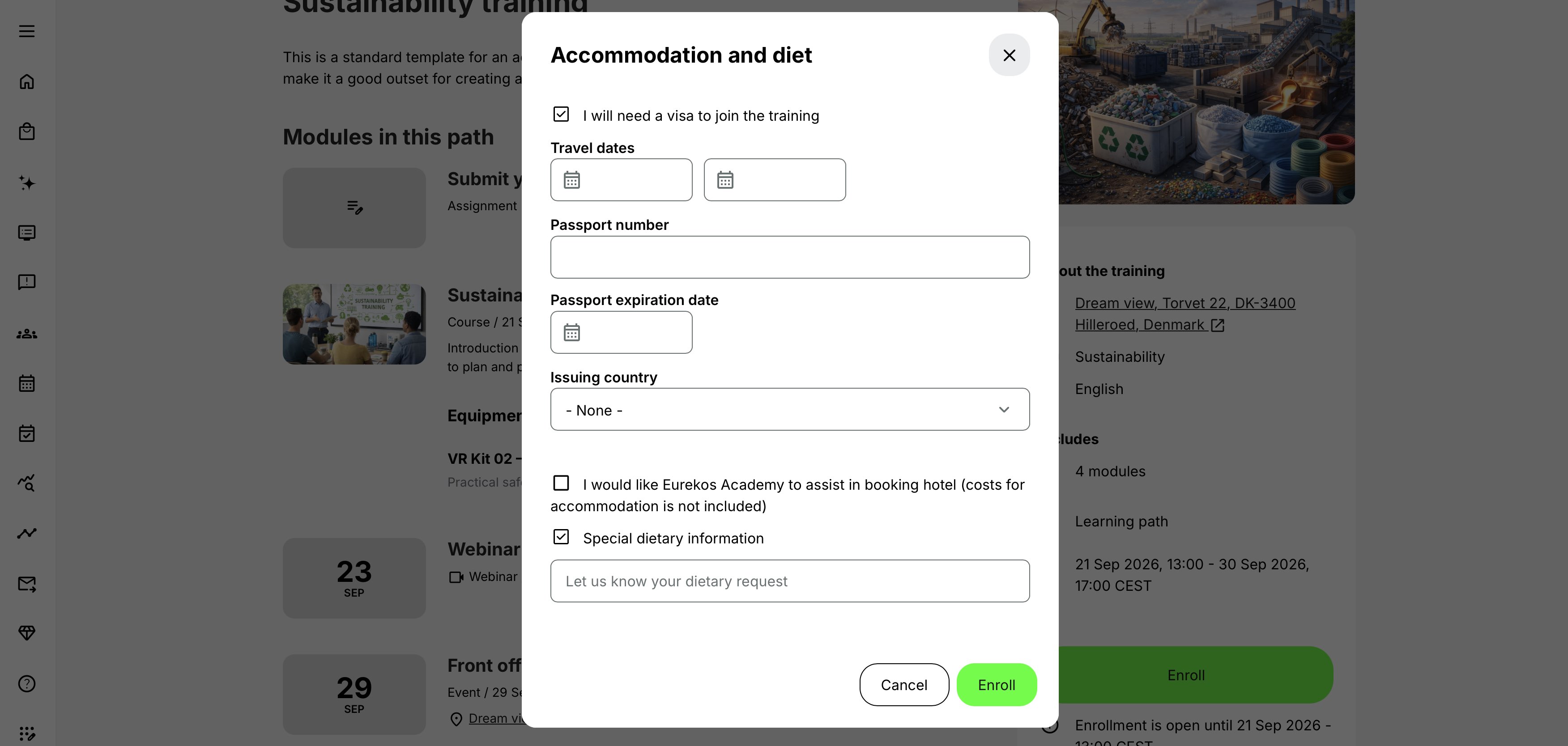
- Eurekos opens the Accommodation and diet popup.
- The popup shows the sections enabled for the Training Activity.
- Selecting a service inside the popup reveals its related questions where applicable.
- The participant enters the relevant information and selects Enroll.
- Enrollment is completed through the simple flow.
- The Activity Description displays Go to training when the participant is registered.
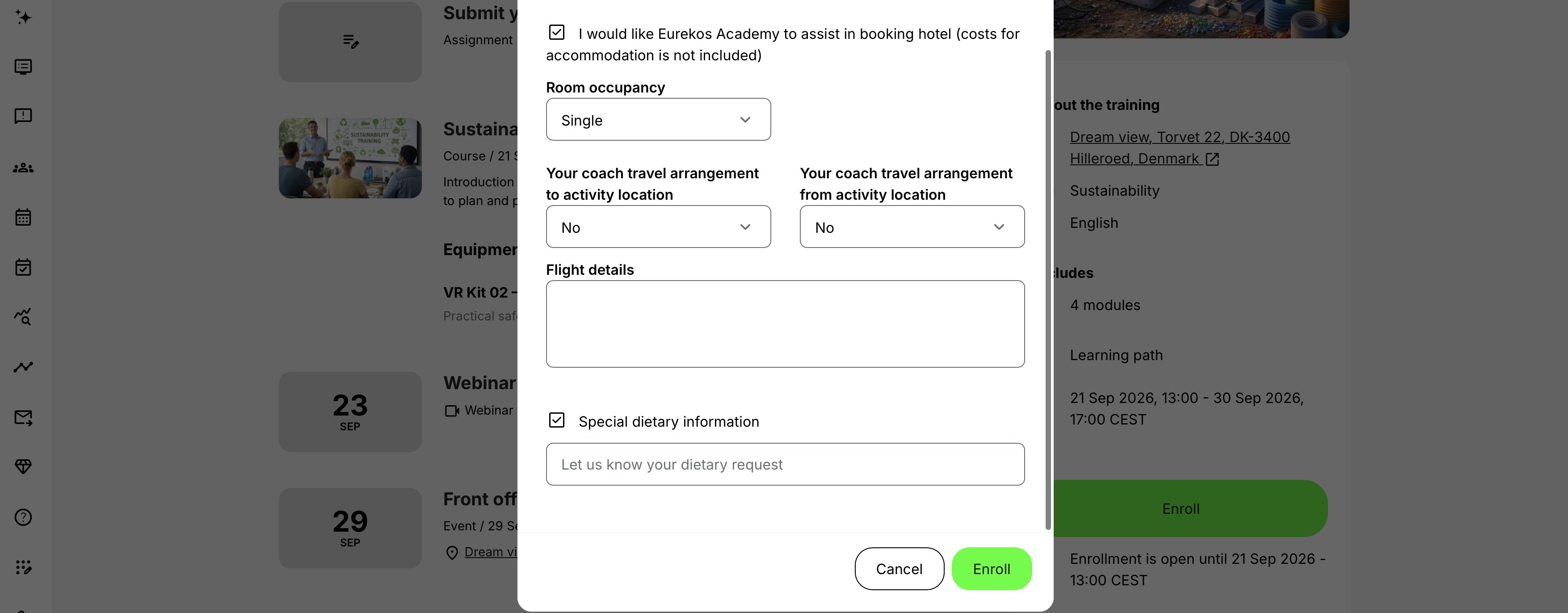
For example, selecting visa assistance can reveal travel and passport fields. Selecting hotel-booking assistance can reveal room occupancy, transfer, and flight questions when those activity-level options are enabled. Selecting dietary support reveals the field for the participant’s dietary request.
Understand hotel and transfer behavior
Transfer assistance is dependent on hotel-booking assistance at activity level.
- Support transfer to/from your activity location appears as a configuration option only when Assist in booking hotel is enabled.
- During enrollment, hotel-related questions appear when the participant selects hotel-booking assistance.
- When transfer support is also enabled for the activity, the hotel section can include travel arrangements to and from the activity location.
- The participant can also provide relevant flight details for the operational team.
This dependency means that Accommodation and diet is not suitable for collecting a standalone local-transport request when hotel assistance is not part of the activity’s configuration. Use another approved process if transport must be collected independently.
Anonymous visitor in the simple flow
An anonymous visitor must authenticate before submitting preferences as an identified participant.
When the visitor selects Enroll:
- They are taken to login.
- After successful login, they return to the Activity Description.
- They can open and complete the Accommodation and diet popup.
Test both an existing account and account creation where public registration is allowed. The return URL, organization alias, Storefront audience, and session context should lead back to the same activity.
Do not place essential booking instructions only before login. Ensure that the authenticated Activity Description still explains the service and deadlines.
Checkout flow
The questions appear during checkout when:
- The activity has a price; or
- The platform does not use the simple enrollment flow for free courses.
Test:
- Every applicable buyer or customer type
- Free standard checkout and paid checkout
- Currency and tax variants
- Payment success, pending, cancellation, and failure
- Whether entered preferences remain available when the participant returns to a previous checkout step
- The resulting signup, Transaction, email, and Signup details
A participant’s request does not prove that the related service has been booked. In particular, do not treat preferences entered during an abandoned or unsuccessful payment journey as a confirmed operational commitment.
Do not enter payment-card details or other financial secrets in free-text booking fields.
Manager and Immediate Manager enrollment
When a Manager or Immediate Manager enrolls another person, the manager does not provide that participant’s personal booking preferences during enrollment.
Instead:
- The target participant receives an email titled Enter your booking preferences.
- The email contains a link to a dedicated booking-preferences page.
- The participant enters and submits their own information.
- After submission, they return to the Activity Description with Go to training.
This avoids asking a manager to guess or disclose another person’s practical or sensitive needs.
The enrollment can exist before the participant completes the booking preferences. Establish a process for monitoring incomplete responses and reminding participants before travel, hotel, or catering deadlines.
Find and handle saved booking preferences
Saved preferences are available through:
- The new-enrollment email sent to the receiver configured under Settings → Commerce → Automation → Email receiver. It includes the applicable accommodation and dietary information.
- Signup details for the activity, available from the activity’s More menu when participant data and the feature are present.
The participant list alone is not a substitute for Signup details when the booking information is needed.
Treat both the email and downloaded details as potentially sensitive:
- Limit mailbox, activity, and report access.
- Avoid forwarding complete messages or exports to broad groups.
- Share only the information each hotel, caterer, travel provider, or colleague needs.
- Use an approved secure transfer method.
- Delete local exports and emails according to the retention schedule.
- Record operational confirmation separately when the organization needs ownership, status, service levels, or an audit history.
Protect sensitive information
Accommodation, dietary, travel, and accessibility responses can reveal health, disability, religion, passport details, or other sensitive personal information. Before using the standard Accommodation and diet questions, consider when the information is genuinely needed, who should receive it, and how long it should remain identifiable.
A questionnaire can provide a more suitable alternative when you need configurable questions, controlled timing, or automatic anonymisation. Questionnaire privacy settings and anonymisation rules can help limit how long responses remain connected to an identifiable person.
| Collection method | When to use it | Privacy and operational considerations |
|---|---|---|
| Accommodation and diet | Use the predefined visa, hotel, transfer, and dietary questions as part of enrollment. | Appropriate when the standard questions match the process and the operational team needs the information with the signup. Responses can appear in enrollment communication and Signup details, so control access, forwarding, export, and retention. |
| Questionnaire before enrollment | Use when information must be collected before enrollment can be completed—for example, when the team must confirm whether a requested arrangement is possible. | Collect only information required at this stage. Configure privacy and automatic anonymisation rules, and explain whether the response affects enrollment or begins a separate follow-up. |
| Questionnaire after confirmed enrollment | Use when detailed information is needed only from people who have secured a place. The questionnaire can be presented at the appropriate point after enrollment. | This avoids collecting sensitive information from people who never become participants. Set a response deadline that leaves enough time for travel, accommodation, accessibility, or catering arrangements. |
| Confidential follow-up process | Use when requirements are too sensitive or complex for a standard enrollment field. | Ask the participant to contact an authorized team through an approved secure channel. Record only the operational outcome where other administrators do not need the underlying details. |
Questionnaires also allow the organization to ask only the questions relevant to its process instead of relying on the fixed Accommodation and diet question set. However, using a questionnaire does not make the information safe automatically. Configure its privacy and anonymisation rules deliberately, restrict access to responses and reports, and test what registered and anonymous users are asked to provide.
Whichever method is used:
- Explain why the information is collected and who will receive it.
- Collect the information at the latest practical point in the participant journey.
- Avoid collecting detailed information before enrollment when it is needed only for confirmed participants.
- Share only the minimum information required by each hotel, caterer, travel provider, or colleague.
- Provide a secure route for complex or confidential requirements.
- Define when responses, emails, reports, and local exports must be anonymised or deleted.
- Do not reuse the information for unrelated profiling, eligibility decisions, or learning assessment.
Align deadlines and operations
Booking preferences are useful only while the responsible team can act on them.
Coordinate:
- Latest registration with visa, hotel, transport, and catering lead times
- Latest cancellation with supplier cancellation terms
- Activity and Event Schedules with travel arrival and departure
- Location details with transfer planning
- Seats and minimum attendance with group reservations
- Participant communication with changes to the date or venue
- The booking-preferences email with a clear response deadline
If information arrives after a supplier cutoff, do not silently accept the request. Contact the participant, explain what can still be provided, and record the agreed outcome through the approved process.
Keep booking preferences separate from other controls
Accommodation and diet supports attendance; it does not control eligibility or create a commercial product.
- Use Self-enrollment requirements for prerequisites such as a certificate or completed Course.
- Use Access Restrictions for access to modules after enrollment.
- Use Registration Details for capacity and registration deadlines.
- Use Additional Products for separately offered or sold items.
- Use Questionnaires when the business process requires configurable questions beyond the predefined Accommodation and diet fields.
- Use Accommodation and diet for the supported visa, hotel, transfer, and dietary requests.
Do not make disclosure of a sensitive condition a learning prerequisite. Where information is needed to arrange an in-person service, provide an appropriate way to state that no assistance is required or offer a confidential alternative according to organizational policy.
Practical configuration patterns
| Use case | Configuration | Operational considerations |
|---|---|---|
| International classroom program | Collect requests for visa, hotel, and transfer assistance. | Close registration early enough for travel processing, explain which costs are covered, and share details only with the authorized travel team. |
| Catered local workshop | Enable dietary requests and communicate the caterer’s response deadline. | Export only the information required by the caterer. Confirm complex requests directly without unnecessarily sharing health-related information. |
| Manager enrolls a team | The manager completes enrollment, after which each participant receives the booking-preferences link. | Monitor incomplete responses and remind participants before the relevant operational deadlines. |
| Paid customer event | Collect accommodation and dietary preferences during checkout. | Keep payment and product information separate from assistance requests. Verify that a failed payment is not treated as a confirmed service booking. |
Verify the configuration
Use representative accounts and the routes enabled for your delivery. Check the relevant outcomes before launch and after a material change; an administrator preview alone does not verify the participant experience.
| Scenario or check | Expected result or evidence |
|---|---|
| Appropriate collection | Only assistance needed for the delivery is requested. Conditional questions, including transfer dependencies, work as configured, and the page explains cost, deadline, and separate confirmation. |
| Participant routes | Test the supported free simple flow, anonymous sign-in and return, standard checkout, and paid outcomes, including mobile, languages, and organization-specific entry points. |
| Enrollment by a manager | A participant enrolled by a Manager or Immediate Manager can supply their own preferences through the intended email and dedicated page. |
| Operational receipt | The correct new-enrollment email receiver and authorized Signup details view contain the necessary information. An owner acknowledges each request and confirms the service or an alternative. |
| Privacy and changes | Suppliers receive only necessary information. Changes and cancellations reach the owner in time for supplier deadlines, and mailbox/export retention follows the approved policy. |
Troubleshooting
| Problem | What to check |
|---|---|
| Accommodation and diet is missing | Confirm that Storefront is enabled and that the administrator can edit activity-level features. |
| Transfer support is missing from the activity options | Enable Assist in booking hotel. The transfer option is displayed only when hotel-booking assistance is enabled. |
| An expected section is missing from the participant popup | Confirm that the corresponding activity-level option was selected and saved. For transfer questions, verify both hotel-booking assistance and transfer support. |
| The individual questions cannot be edited in the activity | This is expected. The feature uses predefined question sets. Wording and translations are managed through the platform’s normal language and taxonomy configuration rather than per activity. |
| The popup does not appear for a free activity | Check Simple enrollment flow for free courses, activity price, Self enrollment, and whether Accommodation and diet and its relevant options were saved. With simple flow disabled, use checkout. |
| The questions appear during checkout unexpectedly | This is expected for a paid activity or when simple enrollment for free courses is disabled. |
| An anonymous visitor remains on login | Check successful authentication, return URL, Activity Description alias, organization and Storefront audience, session, and whether the activity remains available. |
| The participant is enrolled but has provided no preferences | A manager-originated flow can create the enrollment before the participant follows the booking-preferences email. Check message delivery and remind the participant through the approved process. |
| The manager is asked for the participant’s details | Verify the enrollment-for-another-user route, manager relationship, and current platform behavior. The intended route emails the target participant. |
| The participant received no Enter your booking preferences email | Check the target email address, manager relationship, signup result, System Email configuration, mail logs, and spam quarantine. |
| The booking-preferences link fails | Check authentication, link validity, signup status, activity availability, and organization scope. Use the current email and link. |
| Go to training does not appear after submission | Confirm that the preferences were submitted, the signup is Registered, and no separate availability or access condition prevents the normal route. |
| The operations mailbox received no details | Verify Commerce → Automation → Email receiver, new-enrollment email configuration, mail logs, and which options the participant selected. |
| Signup details does not contain the expected information | Confirm that the feature and relevant option were enabled for the activity and that the participant submitted the booking preferences. Generate the activity-specific output with appropriate access. |
| A supplier received too much information | Stop unnecessary sharing, follow the organization’s privacy or incident process, and restrict future exports to the minimum information required. |
| A request arrived after the operational deadline | Compare the enrollment and preference-submission times with supplier cutoffs. Contact the participant and confirm what can still be provided. |
| Support needs evidence | Record the activity and signup IDs, enrollment route, simple-flow and price state, requester and target roles, email timestamp, submission result, and Signup details result. Redact sensitive content unless it is essential and authorized. |
FAQ
-
Can administrators design their own Accommodation and diet form?
No. Administrators choose from predefined activity-level options, and the corresponding questions are shown during enrollment. The platform’s normal wording, translation, and taxonomy configuration can change how the text is presented, but the activity does not provide a custom form builder.
Use questionnaires in the enrollment process to design your own form.
-
Why can I not see Support transfer to/from your activity location?
Enable Assist in booking hotel first. Transfer support is dependent on hotel-booking assistance and is not offered as an independent activity-level option.
-
Why do some participants see a popup and others see questions during checkout?
Free activities use the popup only when Simple enrollment flow for free courses is enabled. Paid activities and free activities using the standard flow present the questions during checkout.
-
What happens when an anonymous visitor selects Enroll?
The visitor is sent to login and then returned to the Activity Description. In the free simple-enrollment flow, the authenticated participant can then open and complete the popup.
-
Should a manager provide preferences for an employee?
No. The target participant receives the Enter your booking preferences email and supplies their own information through the dedicated page.
-
Does selecting hotel assistance confirm a reservation?
No. It records a request for assistance. The responsible team must confirm availability, terms, responsibility for payment, and the final booking.
-
Does selecting transfer assistance book transport?
No. It records the participant’s transfer preferences for operational follow-up. The team must confirm whether and how transport will be provided.
-
Are dietary requests available in activity data?
They can be included in the new-enrollment email and the activity’s Signup details. Restrict access to and retention of those outputs appropriately.