Adaptive Modules - Article
Summary
Adaptive Modules let one Training Activity provide different learning paths to different participants. A module can stay hidden until someone needs it—for example after a low test score—or begin as required and become optional when the participant demonstrates existing knowledge. Eurekos then recalculates the participant's navigation, progress, and completion requirements around the path that applies to that person. Use adaptive rules when personalization has a clear learning purpose, and test every possible route so required learning never becomes hidden or impossible to complete.
In this article you will learn:
- What Adaptive Modules help you achieve and when to use them
- How supplemental, optional, and Always optional modules differ
- How to enable Adaptive Modules at platform and module level
- Which module types can use adaptive behavior
- How Test score, Certificate earned, Event attended, Job function, Organization, SCORM completion, and Test answers criteria work
- How to combine criteria with AND, OR, grouping, and Any of
- How hidden and optional modules affect learner navigation and visibility
- How Do not count progress changes a supplemental module
- When participant progress and completion are recalculated
- Which adaptive changes produce an on-screen notification
- What administrators, responsible instructors, and participants see in Progress
- How Adaptive Modules interact with Access Restrictions, certificates, recommendations, Existing Training, and re-certification
- How Adaptive Learning reporting and Fingerprints support evaluation and follow-up
- How to test, govern, and troubleshoot personalized learning paths
What Adaptive Modules help you achieve
Adaptive Modules change the learning path around an individual participant.
Instead of requiring everyone to complete the same modules, an administrator can use evidence about a participant to decide that a module should:
- Appear only when extra learning is needed
- Appear only for a relevant role or organization
- Become optional after the participant demonstrates existing competence
- Remain available as optional practice without affecting completion
- Add remediation after a low assessment result
- Remove foundation learning from the required path after a strong result
- Provide a specialized branch after an Event, certificate, SCORM/xAPI completion, or selected test answers
Examples:
- A participant with a low pre-assessment score receives an additional foundation Course.
- An experienced technician who passes a placement test can skip basic product training.
- Managers see a leadership scenario that is hidden from other job functions.
- Participants in one organization receive a customer-specific Event or Assignment.
- A learner who already holds the prerequisite certificate can treat an introductory module as optional.
- A practical coaching module appears only after attendance at an earlier workshop.
Adaptive learning changes the participant's route
It is not simply a label or recommendation. A module can be removed from the required path or kept completely hidden until its rule is satisfied. That changes what the participant sees and what Eurekos counts toward progress.
Choose the correct personalization control
Several features can guide different participants toward different experiences. Use the one that matches the outcome.
| Business requirement | Use | What happens |
|---|---|---|
| Add a module only when a learner needs it | Supplemental Adaptive Module | The module stays hidden until criteria are met |
| Let a learner skip a module after proving competence | Optional Adaptive Module | The module begins as required and becomes optional when criteria are met |
| Make a module optional for everyone | Always optional Adaptive criterion | The module remains visible but is excluded from required progress |
| Suggest useful review without changing requirements | Recommendations | The module or Course page receives a Recommended signal; its access and progress role do not change merely because it is recommended |
| Keep a visible module locked until prerequisites are met | Access Restrictions | The module remains visible but cannot be opened until the criteria are satisfied |
| Prevent enrollment until a person qualifies | Self-enrollment requirements | The person sees requirements and cannot self-enroll yet |
| Show or hide an offer to an audience | Storefront Target Audience, Organization, or visibility controls | Discovery changes before the person enters the activity |
| Adapt individual pages inside a Course | Adaptive Pages in Content Authoring | Page-level content changes without changing the Training Activity module structure |
| Assign another complete activity to a group after analysis | Adaptive Learning Fingerprints or an administrative enrollment process | A follow-up Training Activity is assigned as a separate signup |
These features can be combined, but each should have a separate purpose.
For example, a remedial module can remain hidden until a low score makes it supplemental, while a recommendation points the participant to the most relevant pages inside it. If the module also has Access Restrictions, the participant may see it after the adaptive rule is met but still be unable to open it until the restriction is satisfied.
Understand the two adaptive module types
When Adaptive module is enabled on a module, choose one of two behaviors.
| Adaptive type | Before criteria are met | After criteria are met | Progress effect |
|---|---|---|---|
| Module appears if criteria met (Supplemental) | Hidden from the learner and excluded from progress | Appears and normally becomes part of the required path | Progress and activity status are recalculated to include it |
| Module is optional and excluded from progress tracking if criteria met (Optional) | Visible, required, and included in progress | Remains visible, receives Optional status, and can be skipped | Recalculated without requiring the module |
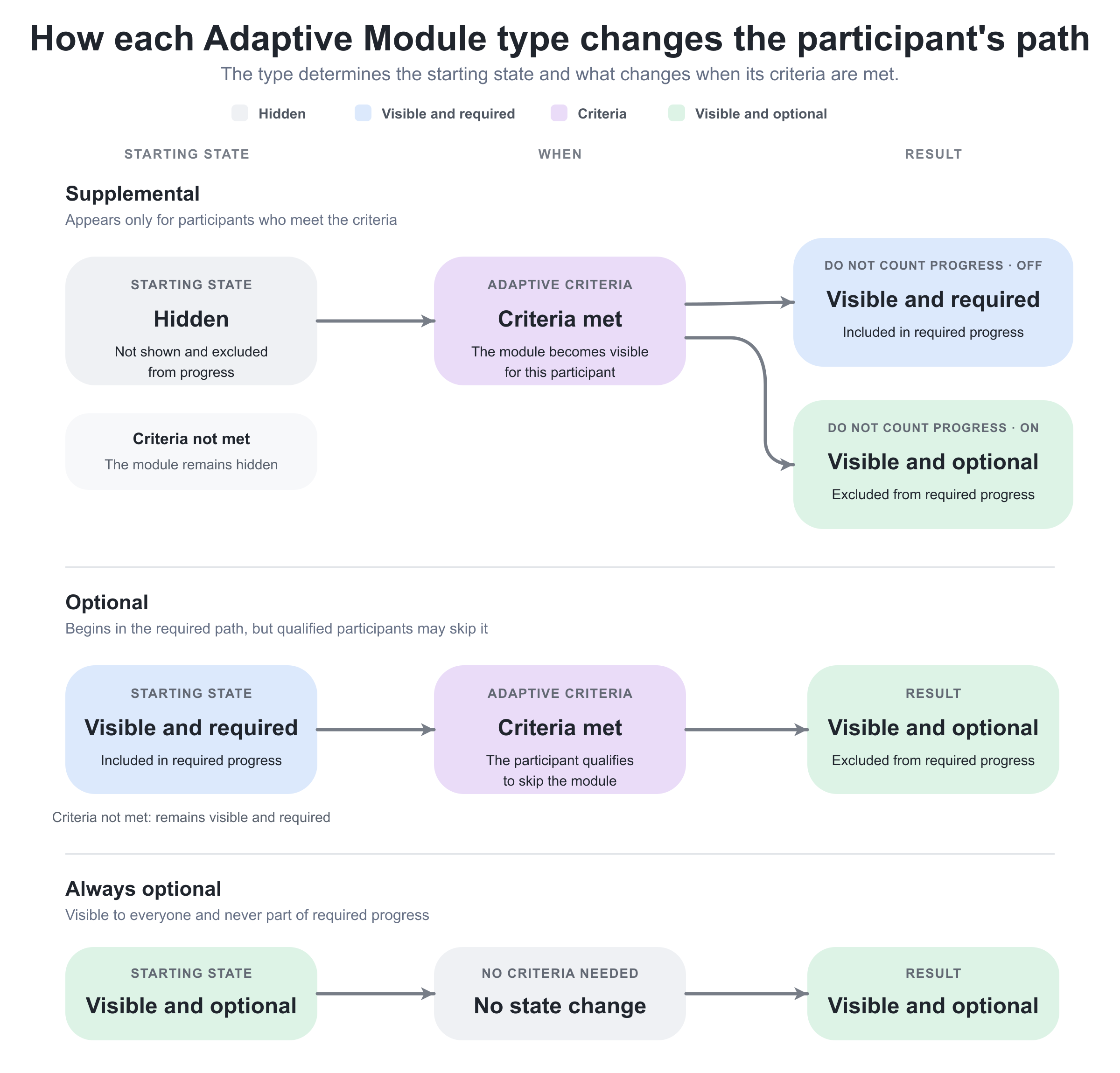
The criteria serve opposite purposes for the two adaptive types:
- Supplemental: Hidden → criteria met → visible and required
The criteria identify participants who need the module. - Optional: Visible and required → criteria met → visible and optional
The criteria identify participants who may skip the module.
Choose the type from the participant’s starting position:
- Use Supplemental when most participants should not see the module and the criteria identify the people who must complete it.
- Use Optional when everyone should initially receive the module as required, but the criteria identify people who may complete the journey without it.
- Use Always optional when the module should remain visible to everyone as voluntary learning and should never be required for completion.
Do not select Supplemental merely because the content feels additional. A Supplemental module remains hidden until its criteria are met, at which point it becomes part of that participant’s required learning path.
Understand where Adaptive Module is available
Adaptive module can be enabled on any Training Activity module type:
- Course
- Event
- Assignment
- Existing Training
The adaptive rule belongs to that module's placement in the current Training Activity.
If the same Course is used in Activities A and B, making its module adaptive in Activity A does not automatically make its placement adaptive in Activity B. The Course content remains reusable; the activity defines the delivery rule around this occurrence.
This distinction is particularly important for:
- Reused Courses
- Repeated and linked activities
- Existing Training modules
- Organization-specific programs
- Different certification attempts
- Language variants
Permissions and ownership
Configuring an Adaptive Module requires permission to edit the Training Activity and its module Features. Course Administrator, Support, Platform Administrator, and Global Administrator roles normally have access, subject to platform configuration and organization scope.
The administrator also needs visibility of the values selected as criteria. A Course Administrator may be allowed to edit the target activity but unable to select a certificate, Event, Course, Question Set, or organization governed by another scope.
Define ownership for:
- Learning design—decides why the participant's path should change.
- Assessment design—ensures scores and answers are valid evidence for the decision.
- Content ownership—keeps adaptive modules and source content available.
- Course Administration—configures the rules and participant journey.
- Certification and attendance—maintains evidence used by certificate and Event criteria.
- Profile governance—maintains Job function and Organization values.
- Analytics—reviews adaptive outcomes and identifies rules that need improvement.
- Support—investigates unexpected participant paths without exposing unnecessary assessment or profile data.
Adaptive logic can create materially different training obligations. Keep the rationale, audience, owner, and validation evidence for every rule.
Configure an Adaptive Module
To configure a module:
- Open Course Administration.
- Open the Training Activity.
- Choose Edit activity.
- Open the Course, Event, Assignment, or Existing Training module.
- Open the module's Features.
- Add Adaptive module.
- Choose Supplemental or Optional behavior.
- Add at least one criterion.
- Select the relevant values, score range, questions, and logic.
- For a Supplemental module, decide whether Do not count progress should be enabled.
- Save the Training Activity.
- Test participants who satisfy and do not satisfy each rule branch.

At least one criterion is required. If the feature is added without criteria, the activity cannot be saved and displays:
Add at least one criteria.
The wording may be grammatically unusual, but it identifies a real validation requirement.

Configure the adaptive criteria
Both Supplemental and Optional types can use the following criteria, except Always optional, which is available only for the Optional type.
| Criterion | Evidence used | Typical purpose |
|---|---|---|
| Always optional | No participant evidence; applies immediately | Keep practice, reference, coaching, or enrichment visible without requiring it |
| Test score | Score from selected H5P Quiz (Question Set) and configured score range | Add remediation after a low score or allow foundational learning to become optional after a high score |
| Certificate earned | Participant has earned one of the selected certificates according to the configured logic | Recognize an existing qualification or reveal qualified-only learning |
| Event attended | Attendance recorded for the selected Event | Open follow-up learning after a practical session or make preparation optional after verified attendance |
| Job function | Current Job function on the user profile | Provide or remove role-specific learning |
| Organization | Current Organization or Suborganization relationship | Personalize training for customers, regions, business units, or partners |
| SCORM completion | Completion from the selected SCORM, xAPI, or supported H5P package context | Adapt the path using completion evidence from externally authored learning |
| Test answers | Correct or incorrect responses to selected questions in an H5P Question Set | Respond to a specific knowledge gap rather than the overall test score |
Always optional
Always optional is available only when the selected adaptive type is:
Module is optional and excluded from progress tracking if criteria met
The criterion is immediately satisfied for every participant. The module:
- Remains visible
- Displays as Optional
- Does not count toward required activity progress
- Can be opened voluntarily
- Is skipped by required-path Next/Previous navigation
- Does not produce the “Your learning journey is now shorter!” popup
Use it for:
- Additional practice
- Optional office hours
- Reference material
- Voluntary coaching
- Alternative examples
- A non-required Existing Training opportunity
Do not use Always optional on evidence that must be completed for certification, compliance, or a later explicitly configured prerequisite.
Test score
Select one or more H5P Quiz (Question Set) tests and define the score range that should trigger the adaptive status.
Examples:
- Supplemental foundation module appears when score is 0–59%.
- Optional foundation module becomes optional when score is 85–100%.
- Advanced challenge appears when score is 95–100%.
Use ranges that reflect a defensible learning decision. Avoid gaps or overlaps unless they are intentional and tested.
Confirm:
- The selected object is the correct Question Set.
- Its pass and scoring logic matches the adaptive range.
- Attempts and retakes behave as expected.
- A later changed score can update adaptive status as intended.
- The participant can access the assessment before the dependent module decision is needed.
Certificate earned
Select the certificate or certificates that should trigger the rule.
This can support:
- Making introductory learning optional for already qualified participants
- Revealing advanced content to certified participants
- Adding a refresher path after a particular qualification is earned
- Recognizing completion achieved through another Training Activity
Check the exact certificate ID and lifecycle. Similar titles, module-level versus activity-level issuance, expiration, re-certification attempts, and revoked or removed certificates can affect the evidence available to the participant.
Adaptive Module criteria and certificate issuance must not form a circular dependency. A module cannot remain hidden until the participant earns a certificate whose criteria require that same hidden module.
Event attended
Select the Event or Events whose recorded attendance should trigger adaptivity.
Registration, calendar acceptance, joining a webinar, or the passage of the Event end time is not necessarily the same as recorded attendance. Confirm the responsible instructor or administrator marks attendance through the supported process.
Use cases include:
- Open post-workshop practice after confirmed attendance.
- Make an introductory Event optional for participants who attended an equivalent earlier session.
- Reveal an Assignment only to participants who attended the practical briefing.
Ensure the Event is reachable and occurs before the adaptive decision needs to be made.
Job function
Select the Job function values that should trigger the adaptive status.
Use controlled vocabulary values rather than free-text assumptions. Confirm the participant's profile is current before enrollment and remains governed by the authoritative identity or HR/CRM process.
Examples:
- A leadership scenario appears for Managers.
- A basic sales module becomes optional for Senior Account Executives.
- A technical Assignment appears for Field Engineers.
A profile change can change the participant's adaptive result. Plan what should happen when someone changes role during an active learning journey.
Organization
Select the Organization or Suborganization values that should trigger adaptivity.
When a top-level Organization is selected, the rule applies to:
- The selected top-level Organization
- All of its Suborganizations at every level
This inheritance is useful for broad customer or business-unit targeting, but it can include more users than a single visible node suggests.
When the Organization filter is enabled, administrators can select only Organizations they belong to and their Suborganizations. Existing selected values from another scope can be difficult or impossible for a more narrowly scoped administrator to restore after removal.
Use distinct modules when customer-specific material, legal obligations, or proprietary content require clear separation. Do not rely only on a hidden adaptive module as the sole security boundary for sensitive information.
SCORM completion
Use SCORM completion to trigger adaptivity from supported SCORM, xAPI, or H5P package completion evidence.
Verify what the external package actually reports. A package can report:
- Completion
- Success or pass/fail
- Score
- Progress
- No usable completion signal
The adaptive criterion needs the completion state it expects. Test the exact package, version, launch context, reset behavior, and repeated attempts.
Do not treat “the participant opened the package” as completion unless the package reports it that way and the learning policy accepts that evidence.
Test answers
Test answers use selected questions from an H5P Question Set.
Configuration includes:
- Select the Question Set.
- Select the relevant questions.
- Decide whether the selected answers should be evaluated as correct or incorrect.
- Decide whether all selected questions must match or an accepted combination is sufficient.
- Combine this criterion with other criteria where required.
Use Test answers when the overall score is too broad.
Example:
A participant passes the assessment overall but answers the data-privacy question incorrectly. Reveal the privacy-remediation module specifically for that knowledge gap.
Question wording, order, identifiers, answer options, and correctness configuration are dependencies. Review adaptive rules whenever the source Question Set changes.
Combine criteria with AND, OR, and Any of
Adaptive Modules support:
- Multiple criteria
- Multiple selected values inside a criterion
- AND relationships
- OR relationships
- Grouping when OR is used
- Any of behavior for supported multi-value selections
Write the rule in plain language before building it.
Example:
Show the remediation module when the participant scores below 60% AND belongs to the Technician job function, OR when the participant answered the critical safety question incorrectly.
Represent it as:
(Test score below 60% AND Job function is Technician) OR (Critical safety answer is incorrect)
Understand Any of
Any of determines whether one accepted selected value is enough inside a criterion.
Example:
Organization is any of: - Partner North - Partner South - Partner West
This differs from top-level OR between different criterion types.
Avoid accidental bypasses
A broad OR can make a rule much easier to satisfy than intended.
For complex rules:
- Write every valid path.
- Write every invalid path that must remain unchanged.
- Draw the grouping.
- Configure one branch at a time.
- Test each single criterion.
- Test each AND combination.
- Test each OR branch.
- Test participants with several matching values.
- Test blank or missing profile values.
- Recheck after editing the source assessment or vocabulary.
If the rule cannot be explained clearly, simplify the learning design before enrolling participants.
Configure a Supplemental Adaptive Module
Select Module appears if criteria met (Supplemental) when the module should remain hidden until the participant qualifies for or needs it.
Before criteria are met, the learner does not see the module in:
- Dashboard or participant overview
- Profile training information
- Learn mode
- Learning-path overview
- Progress and My Progress
- Emails and adaptive notifications
- Calendar
- Global search
- User transcript
- Storefront
This is stronger than a visible lock. The participant is not told that the hidden module exists.
Activity containing only hidden adaptive modules
If a Training Activity contains only Supplemental Adaptive Modules and the current user has not met any of their criteria, the activity is not shown to that user in the Storefront. The same applies to anonymous visitors.
If the user is already enrolled and a later change leaves them with no visible modules:
- The activity tile can remain in Trainings I attend or the profile context.
- The tile is not clickable because the participant has no accessible module route.
Avoid publishing an activity with no guaranteed starting point unless invisibility is the deliberate design.
Navigation when some modules remain hidden
If only one module is currently visible while another Supplemental module remains hidden, Eurekos routes the learner to the learning-path overview rather than skipping directly into the visible module. This keeps navigation ready for a path that may change.
When a Supplemental module becomes visible:
- It appears on the learning-path overview.
- Its navigation action becomes available.
- Next module behavior can route to the newly unlocked module where applicable.
- Progress and activity status are recalculated.
Supplemental unlock notification
An in-platform notification can appear when a new Supplemental module unlocks:
[Module name] has been unlocked in [Activity description title].
The documented notification has two important limits:
- It is available for Test score and Certificate earned criteria.
- It appears only when the participant is currently inside the activity content.
Do not promise an unlock popup for Event attendance, Job function, Organization, SCORM completion, or Test answers unless the complete behavior has been verified on your platform.
For a path change that happens while the participant is elsewhere, use Activity Description guidance or a supported communication process if they need to be told proactively.
Decide whether a Supplemental module should count toward progress
Without Do not count progress, the Supplemental module becomes required after it appears.
Standard Supplemental behavior
Before the trigger:
- The module is hidden.
- It does not count in progress.
- It cannot block completion because it is not yet part of the participant's path.
After the trigger:
- The module becomes visible.
- It is included in progress.
- It becomes part of the participant's required path.
- The activity's progress percentage and status are recalculated.
The recalculation can lower a participant's apparent progress because a new required component has been added. It can also move the activity away from a previously expected completion state when the newly applicable requirement remains unfinished.
Use this for genuine remediation, specialization, or follow-up that the participant must complete.
Supplemental with Do not count progress
Enable Do not count progress when the module should appear after the criteria are met but remain optional.
After the trigger, the module:
- Appears on the learning-path overview
- Is presented as Optional
- Does not count toward progress
- Is not required to complete the activity
- Can still be opened voluntarily
No additional special popup is introduced solely because Do not count progress is enabled; the normal documented Supplemental unlock behavior remains tied to its supported trigger context.
Use this for targeted resources that are useful but not required, such as:
- Reference material after a particular answer
- Optional coaching after a low score
- A specialized deep dive for one role
- Additional examples for one organization
Configure an Optional Adaptive Module
Select Module is optional and excluded from progress tracking if criteria met when the module should begin as required and later become skippable.
Before the criteria are met:
- The module is visible.
- It is included in the required path.
- It counts toward progress and completion.
- Normal Next/Previous navigation includes it.
After the criteria are met:
- The module remains visible.
- It receives an Optional tag.
- It is excluded from required progress.
- The participant can complete the activity without it.
- Required-path navigation skips it.
If an activity contains only optional modules, an Optional tag can also appear on the activity in Trainings I attend.
Navigation after a module becomes optional
When an Optional Adaptive Module changes state, Eurekos rebuilds the participant's required navigation path.
- If the optional module was the last remaining item after a required module, no Next button is shown for another required module.
- If another required module follows it, Next routes to that required module.
- Previous navigation follows the same principle and skips optional content in the required sequence.
The optional module remains available from the learning-path overview. Navigation skipping does not delete it.
“Your learning journey is now shorter!” notification
When criteria cause a module to become optional, Eurekos can display:
Your learning journey is now shorter!
The popup can include available module information such as:
- Title
- Dates
- Module description
- Location
- Content
- For Existing Training, selected activity titles, dates, and locations
The participant can:
- Choose Go to learning path to open the overview.
- Close the popup and remain on the current page.
The Go to learning path action is omitted when the participant is already on the learning-path overview.
The popup does not appear for Always optional, because the module did not change from required to optional during the learner's journey.
Completion messaging and the adaptive popup can occur near the same action. Test the final required module so the participant receives a coherent conclusion rather than contradictory directions.
Understand progress and completion recalculation
Adaptive progress is participant-specific.
| Adaptive state | Included in required progress? | Can block completion? |
|---|---|---|
| Supplemental, criteria not met and hidden | No | No |
| Supplemental, criteria met | Yes, unless Do not count progress is enabled | Yes, when included |
| Supplemental, criteria met, Do not count progress enabled | No | No through ordinary progress calculation |
| Optional, criteria not met | Yes | Yes |
| Optional, criteria met | No | No through ordinary progress calculation |
| Always optional | No | No through ordinary progress calculation |
When a module changes state, Eurekos recalculates the activity progress and status around the new required path.
This can create changes that initially look surprising:
- Progress falls after remediation appears.
- Progress rises after a foundation module becomes optional.
- An activity becomes completable without an optional module.
- Two participants show different progress despite completing the same visible content.
- A participant who later changes Job function or Organization receives another path calculation.
Do not compare adaptive participants as though every person had the same denominator. Use the Adaptive Learning report to understand the path applied to each learner.
Understand visibility for administrators and responsible users
Adaptive visibility depends on whether the person is acting as a learner.
| Perspective or context | What is visible | How to interpret it |
|---|---|---|
| Participant or dual-role user | When an administrator, instructor, or other user is enrolled as a participant, the adaptive rules for that participant relationship apply. | Elevated permissions are not proof that the participant journey is configured correctly. Test with a representative participant account where possible. |
| Administrator not enrolled as a learner | Administrative roles can see Adaptive Modules in administrative areas. In the Storefront, administrators can also see Supplemental modules that an ordinary participant has not unlocked. | Administrative visibility supports configuration and troubleshooting; it does not represent the ordinary participant experience. |
| Responsible instructor or other non-administrator not enrolled as a learner | A non-administrator who is Responsible for the training can see the configured Supplemental module in operational areas, even when a learner has not unlocked it. Supplemental modules remain hidden from non-administrator roles in the Storefront. | Operational access and Storefront visibility follow different rules. |
| Activity-level Progress view | The administrative Progress view shows all modules configured in the Training Activity. | This view represents the complete designed structure, not one participant’s adaptive route. |
| Individual participant statistics | A Supplemental module is omitted while it remains hidden for that participant. | Use this view to understand the participant’s current personalized path. |
| Supplemental module statistics | The module’s own statistics can include users who do not currently have access to it. | Do not interpret inclusion in module statistics as proof that the module is visible or required for that user. |
| Progress filters and toggles | Available controls can distinguish optional and mandatory modules in Progress analytics and My Progress. | Check the selected view and filters before comparing participant or module results. |
Coordinate Adaptive Modules with Access Restrictions
Adaptive Modules decide whether a module is part of the participant's path. Access Restrictions decide whether a visible supported module can be opened.
When a Course, Event, or Assignment prerequisite becomes optional through adaptivity, Eurekos excludes it from the corresponding later Access Restriction for:
- Complete course
- Attend event
- Pass assignment
This prevents a module that the participant is allowed to skip from continuing to block a later module.
The exclusion is documented for those three criterion types. Do not assume every other explicit rule reference is automatically removed.
Test combinations involving:
- Pass test
- Watch video
- Earn certificate
- Complete activity
- Acquire skill
- Date restrictions
- Certificate criteria
- Automated Email Workflow audiences
Avoid circular paths such as:
Supplemental Module B appears after Module C is completed Module C is restricted until Module B is completed
For more detail, see Access restrictions.
Coordinate Adaptive Modules with certificates
Adaptive progress and certificate criteria must agree on what is required.
Before connecting a certificate, decide:
- Does the certificate require completion of each participant's adaptive required path?
- Is a Supplemental remediation module mandatory once triggered?
- Should an Always optional or optional module ever contribute to certificate issuance?
- Can a certificate criterion trigger the same module that is needed to earn it?
- What happens in a re-certification attempt?
Making a module optional in progress does not justify assuming every explicitly configured certificate rule ignores it. Test the exact certificate criteria and participant route.
For certificate-triggered adaptivity, confirm whether expired, renewed, or differently scoped certificates provide the intended evidence. Do not use similar titles as a substitute for selecting the exact credential.
Coordinate Adaptive Modules with Existing Training
An Existing Training module can itself be adaptive.
Use cases include:
- Reveal a remedial Training Activity after a low score.
- Make an introductory program optional for a participant who already holds a certificate.
- Offer a permanently optional coaching activity.
- Show a customer-specific nested activity based on Organization.
Adaptivity controls the Existing Training module's role in the parent learning path. The selected child Training Activity remains independent and retains its own:
- Enrollment rules
- Capacity and Waiting list
- Schedule
- Access Restrictions and Access Expiration
- Completion
- Certificates
- Communication
- Commerce
Making the parent module visible does not guarantee the participant can enroll in or open the child activity. Test the complete parent-to-child journey.
Coordinate Adaptive Modules with Recommendations
Recommendations guide attention; adaptivity changes the path.
| State | Participant experience |
|---|---|
| Recommended only | Module or page is suggested, but its required/optional role does not change |
| Supplemental only, not triggered | Module remains hidden |
| Supplemental and recommended, only recommendation criteria met | Hidden module cannot be acted on yet |
| Supplemental and recommended, both criteria met | Module appears and can show the Recommended signal |
| Optional and recommended | The participant can see both Optional and Recommended information |
| Restricted and recommended | Recommendation can be visible while access remains locked until restriction criteria are met |
When an administrator selects a Supplemental module or one of its pages as a recommendation, Eurekos warns that the target may not be available to every participant.
Do not recommend content that the participant cannot reach unless the path clearly explains how it becomes available.
Recommendations can also target Course pages. That is separate from module-level adaptivity and belongs in Recommendations and Learning Guidance.
Coordinate Adaptive Modules with re-certification
A new re-certification attempt can evaluate adaptive evidence in a different attempt context.
Review:
- Whether prior Test score or answer evidence should count.
- Whether the current certificate triggers an optional or supplemental module.
- Whether the certificate expires before it can supply the intended criterion.
- Whether Course progress is carried into the new attempt.
- Whether required remediation should be repeated.
- Whether a profile-based rule changed since the earlier attempt.
- Whether Event attendance belongs to the current renewal cycle.
Do not assume that a path appropriate for initial certification remains appropriate for renewal. Test first and subsequent attempts separately.
Analyze adaptive outcomes
Use the Adaptive Learning Report to examine which rules triggered, how participant paths changed, how progress was recalculated, and whether the design produced the intended completion and certification outcomes.
Adaptive Learning Fingerprints is an Analytics capability, not an Adaptive Module setting. It combines engagement with configured pre- and final-assessment results to support cohort analysis and targeted follow-up. Fingerprint data is generated when the template is first opened and must be updated when current data is required. Review the resulting cohort before assigning further training.
For advisory guidance based on H5P Question Set answers, use Recommendations and Learning Guidance. A recommendation draws attention to a module or Course page; it does not by itself make that content required, optional, supplemental, or accessible.
Manage large selector lists
Adaptive criterion selectors can appear as either:
- A simple selection list
- An autocomplete search field
The interface changes according to the number of available values. By default, lists with more than 100 items use autocomplete, although the threshold can be adjusted in platform configuration.
If a value appears missing:
- Search its exact title.
- Confirm its organization scope.
- Confirm it is the supported object type.
- Check whether it is active and accessible.
Do not create duplicate certificates, Events, or tests merely because a selector changed from a list to search.
Change an adaptive rule on a live activity
Adaptive rules can change participant visibility, progress, status, navigation, and completion requirements.
Before editing:
- Identify every active, completed, and upcoming participant.
- Export or record the current adaptive outcomes.
- Review the source tests, certificates, Events, profiles, Organizations, and packages.
- Determine which participants will gain or lose a module.
- Determine which required modules will become optional or required again.
- Review Access Restrictions and certificate criteria.
- Review Mandatory deadlines and Access Expiration.
- Test the change on a controlled copy where possible.
- Prepare participant and instructor communication.
- Save and inspect representative participant paths.
- Update Adaptive Learning analytics before evaluating the result.
A live rule change can reduce or increase the required path. Do not use it as a casual way to correct one participant. If the business decision is an individual exception, determine whether a different administrative process is more appropriate.
Profile-driven rules can change during learning
Job function and Organization are current profile attributes. An HR, SCIM, integration, import, or administrator update can change them while the participant is enrolled.
Decide whether current profile state or enrollment-time state should drive the business requirement. If the policy needs an immutable historic classification, confirm the platform behavior supports that need or capture evidence separately.
Clone, repeat, and link adaptive activities safely
Clone
Cloning an activity copies modules and enabled module features according to the activity cloning behavior. Review every adaptive rule before enrollment.
Check:
- Selected tests and questions
- Score ranges
- Certificates and Events
- Job function and Organization criteria
- SCORM/xAPI packages
- AND/OR grouping
- Do not count progress
- Access Restrictions and certificate criteria
- Recommendations
A copied rule can still point to source objects that do not belong to the new audience.
Repeat
Repeating a scheduled activity creates a new linked occurrence. Review Event attendance criteria in particular. A copied rule that references the source Event may never trigger for participants in the new occurrence.
Linked activities
Adaptive Module is a module-level feature. Activity-form Apply to all behavior for linked activities does not synchronize modules and their features as though they were one shared curriculum.
Maintain and test the adaptive rule in each delivery that contains its own module structure. Use a governed template or clone when consistent replication is required.
Design and verify an adaptive path
Start with the intended learning outcome for each participant group. For example:
| Participant profile or evidence | Expected adaptive outcome | Required completion path |
|---|---|---|
| Low pre-test score | Remediation Course appears | Foundation → remediation → final assessment |
| High pre-test score | Foundation Course becomes optional | Final assessment remains required |
| Job function is Manager | Leadership scenario appears | Standard path plus required leadership scenario |
| Holds Foundation certificate | Introductory module becomes optional | Advanced modules remain required |
| Organization is Partner North | Regional Event appears | Partner path includes the Event |
| Critical question incorrect | Privacy remediation appears but does not count progress | Required path unchanged; optional guidance visible |
Then use representative accounts to verify the rule and its downstream effects.
| Scenario or check | Expected result or evidence |
|---|---|
| Logic and boundaries | Test no match, partial AND, each OR branch, combined matches, and every score boundary or relevant answer combination. Missing profile data, Suborganizations, and changing profiles have intentional outcomes. |
| Evidence and attempts | Test valid, missing, expired, or renewed certificate evidence, Event attendance, SCORM/xAPI completion, retakes, changed answers, and re-certification where used. |
| Participant presentation | Supplemental modules remain hidden before triggering; Optional modules remain accessible with the intended navigation. Check Storefront, path overview, labels, popups, and enrolled instructor or administrator accounts. |
| Progress and completion | Each path produces the intended percentage, required work, completion, and certificate. Do not count progress does not inadvertently make required remediation optional. |
| Dependencies and communication | Prerequisites remain reachable, child enrollment works, and Mandatory or expiration dates allow enough time. Recommendations and messages do not direct participants to hidden or unavailable content. |
| Live changes and reporting | Compare new, active, completed, and renewal attempts after changes. Source objects and repeated Event references remain correct; participant communication, Progress, Adaptive Learning reports, and fingerprint-dependent follow-up use the updated state. |
Practical configuration patterns
| Configuration pattern | Requirement and configuration | Result and checks |
|---|---|---|
| Remediation after a low score | Requirement: Participants who score below 60% need a required foundation module. Configuration: Supplemental Adaptive Module with Test score 0–59%. Leave Do not count progress disabled. | Result: Hidden from stronger participants; visible and required for participants within the configured score range. Check: Score boundaries, retakes, progress recalculation, final Access Restrictions, and certificate criteria. |
| Fast-track experienced learners | Requirement: Participants scoring 85% or above may skip introductory training. Configuration: Optional Adaptive Module with Test score 85–100%. | Result: The introduction begins as required, then becomes Optional and leaves the required navigation path for qualified participants. Check: The assessment is reachable before the introduction becomes an obstacle. |
| Role-specific required scenario | Requirement: Managers must complete an additional leadership scenario. Configuration: Supplemental Adaptive Module with Job function: Manager. Leave Do not count progress disabled. | Result: The scenario is hidden from other participants and becomes required for Managers. Check: Profile-data quality and what happens when Job function changes. |
| Customer-specific optional resource | Requirement: One customer group should see an additional reference module without changing completion. Configuration: Supplemental Adaptive Module with an Organization criterion and Do not count progress enabled. | Result: The resource appears only for the selected Organization and included Suborganizations but remains optional. Check: Organization inheritance, content confidentiality, and administrator scope. |
| Qualification-based bypass | Requirement: Participants who already hold a Foundation certificate may skip the foundation module. Configuration: Optional Adaptive Module with Certificate earned. | Result: Certificate holders see the module as Optional; other participants must complete it. Check: Certificate validity, re-certification, and whether prior evidence should count. |
| Targeted response remediation | Requirement: A participant who answers a critical question incorrectly should receive extra guidance even when their total score is high. Configuration: Supplemental Adaptive Module using Test answers. Enable Do not count progresswhen the guidance is advisory. | Result: The module appears for the participant with the specific knowledge gap. Check: Question identity, answer correctness, retakes, and Recommendations to relevant pages. |
| Optional coaching Event | Requirement: Everyone may join a live coaching session, but it must not block completion. Configuration: Event module with Optional Adaptive Module and Always optional. | Result: The Event remains visible with Optional status and is skipped by required navigation. Check: Seats, registration, Schedule, reminders, attendance, and whether optional participation affects certificates. |
Troubleshooting
| Problem | What to check |
|---|---|
| The activity will not save | Check whether Adaptive module was added without criteria. Add at least one valid criterion or remove the feature. Review any invalid or inaccessible selected values. |
| Always optional is missing | Confirm the type is Module is optional and excluded from progress tracking if criteria met. Always optional is not available for Supplemental behavior. |
| A criterion value is missing from the selector | Confirm the object type, exact title, organization scope, active status, and administrator access. Large lists can use autocomplete rather than a complete dropdown. |
| The selector changed to a search field | This is expected when the available-value count exceeds the configured threshold, which is 100 by default. Search the exact value instead of expecting a full list. |
| An Organization cannot be selected | Check the Organization filter and the administrator's own memberships. Scoped administrators can select their Organizations and Suborganizations, not unrelated branches. |
| Selecting a parent Organization affected too many users | A top-level selection includes all Suborganizations at every level. Replace it with the intended lower node or redesign the rule, then retest affected participants. |
| A participant cannot see a Supplemental module | Confirm the exact participant has satisfied every required criterion branch. Check score range, certificate, attendance, profile values, package completion, test answers, AND/OR grouping, and background recalculation. |
| The Supplemental module appears before expected | Inspect OR grouping, Any of, profile values, prior completion in another activity, earlier certificates, Event attendance, and assessment attempts. One already-satisfied branch may be enough. |
| A Supplemental module appears for one learner but not another | This can be expected. Compare participant evidence, profile data, attempts, organization relationships, and the rule outcome rather than comparing only enrollment in the activity. |
| The participant sees no activity in the Storefront | Check whether the activity contains only Supplemental modules and the user meets none of their criteria. Also review ordinary Storefront, audience, Organization, self-enrollment, and date controls. |
| An anonymous user cannot see the activity | An activity containing only currently hidden Supplemental modules is also hidden from anonymous visitors. Provide a non-adaptive starting point or another discovery route if anonymous visibility is required. |
| An enrolled activity tile is visible but cannot be clicked | The participant may have no currently visible adaptive modules. Review whether a live rule or profile change removed the only route and restore an intentional starting point. |
| The learner goes to the learning-path overview instead of directly into the only visible module | This is expected when hidden Supplemental modules still exist. The overview supports a path that can change later. |
| The new module appeared but no popup was shown | Confirm whether the criterion was Test score or Certificate earned and whether the participant was inside the activity when it triggered. Other criteria do not have the documented unlock popup. |
| The unlock popup names the wrong activity | Review the Activity Description title and the participant's actual activity context. Distinguish internal activity title, description title, linked activities, and reused source modules. |
| Progress dropped after a module appeared | This is expected when a Supplemental module becomes visible and Do not count progress is disabled. The new module is now part of the required path. Verify that the remediation was intended to be mandatory. |
| A previously completed activity is no longer in the expected state | Check whether a newly triggered required Supplemental module caused activity progress and status recalculation. Review the trigger time, completion evidence, certificate criteria, and any dependent automation. |
| The Supplemental module should be advisory but now blocks completion | Enable Do not count progress if the business intent is optional guidance, then retest existing participants and any explicit certificate or restriction rules that still reference the module. |
| Do not count progress is enabled but the module remains hidden | This option changes progress only after Supplemental criteria are met. It does not make the hidden module visible by itself. |
| A module did not become optional | Confirm the Optional type, exact criterion evidence, AND/OR grouping, score boundary, profile values, attendance, package completion, or answers. Always optional should apply immediately. |
| A module is Optional but remains in Next/Previous navigation | Refresh the learning path after the adaptive-status popup, confirm the participant's current state, and verify the module truly left required progress. Record the route and browser state if navigation remains stale. |
| Next skips a module the participant still wants to take | This is expected for Optional content in the required navigation path. The participant can open the module from the learning-path overview. |
| The “Your learning journey is now shorter!” popup did not appear | Confirm the module changed from required to optional during learning. The popup is not shown for Always optional. Also check whether the participant was already on the learning-path overview. |
| The popup has no Go to learning path button | This is expected when the participant sees it while already on the learning-path overview. Close the popup to remain there. |
| A Test score boundary behaves unexpectedly | Check the exact score, inclusive range behavior on your platform, Question Set scoring, pass percentage, attempts, and whether another OR branch also triggered the rule. Test values immediately below, at, and above each boundary. |
| A test retake changes the adaptive path | Review whether the current score or answers replaced earlier evidence and whether the learning policy permits reversals. Test the allowed attempt model and communicate path changes clearly. |
| Certificate earned does not trigger the module | Confirm the exact certificate ID, issuance level, participant, current attempt, completion criteria, and whether issuance processing finished. Similar certificate titles are not interchangeable. |
| A certificate-triggered path forms a loop | Map the certificate's criteria and adaptive module. Remove any dependency in which the certificate requires the module that only appears after the certificate is earned. |
| Event attended does not trigger the module | Confirm attendance was explicitly marked for the correct participant and Event. Registration, calendar acceptance, webinar joining, or Event end alone may not supply attendance evidence. |
| A Job function rule stopped matching | Inspect the participant's current profile and its source, such as HR integration, SCIM, import, or administrator edit. Verify the selected vocabulary value was not renamed, replaced, or cleared. |
| An Organization rule changed after a profile update | Compare the user's current Organization/Suborganization memberships, parent inheritance, organization-filter behavior, and the business policy for mid-journey changes. |
| SCORM completion does not trigger the module | Inspect the package's completion statement, success, score, version, launch context, and attempt. Confirm the selected object is the same package the participant completed. |
| Opening a SCORM package triggered nothing | Opening is not necessarily completion. Finish the package and verify it reports the completion state required by the criterion. |
| Test answers trigger the wrong participants | Confirm the exact Question Set and question IDs, correct-versus-incorrect configuration, all/any behavior, AND/OR grouping, answer changes, and whether the source assessment was edited. |
| Editing the Question Set broke an adaptive rule | Review renamed, removed, reordered, or replaced questions and answer correctness. Reconfigure and retest every rule and Recommendation using that assessment. |
| A participant met evidence in another activity and the module changed | This can be expected when the selected evidence is recognized across activity contexts. Decide whether prior learning should count and redesign the source or attempt model if evidence must be current. |
| An optional module still blocks a later module | Confirm the later Access Restriction is Complete course, Attend event, or Pass assignment and points to the module that became optional. Other explicit criterion types are not covered by the documented exclusion. |
| An optional module still appears in certificate criteria | Adaptive progress and explicit certificate configuration are separate. Review the certificate rule and decide whether the optional module should remain evidence. Do not assume adaptivity rewrites every cross-feature reference. |
| A Recommended module remains hidden | The recommendation criterion can be met while a Supplemental Adaptive criterion is not. The participant sees the recommendation only when the target becomes available. Align the two designs. |
| A module shows both Recommended and Optional | This can be intentional. Recommendation guides attention while Optional means it is not required for progress. Confirm the combined message makes sense. |
| An administrator sees a module the participant cannot see | This is expected in administrative context. Open the participant's individual statistics or use a representative learner account to verify the actual adaptive path. |
| An administrator enrolled as a learner cannot see the module | Participant adaptive rules apply to the administrator's signup. Elevated permissions in other areas do not mean the learner route should bypass adaptivity. |
| The participant is missing from the Supplemental module statistics | Check organization scope, activity/signup status, report filters, and data refresh. Module-level statistics can include users without access, but the exact view still respects reporting permissions and filters. |
| Progress percentages differ between participants with similar activity | Compare their adaptive required paths, optional/supplemental status, triggers, and recalculation time. The denominator can legitimately differ by participant. |
| Adaptive Learning report appears out of date | Regenerate or refresh the report using its current controls, confirm filters and scope, and distinguish the standard Adaptive Learning report from a Fingerprint template. |
| Adaptive Learning Fingerprint scores are stale | Fingerprint data does not refresh automatically after first generation. Open the template and select Update before making follow-up assignment decisions. |
| An activity is missing from Fingerprint template selection | Confirm it contains a Course with an H5P Quiz (Question Set) that can serve as the pre- and final-assessment and that the administrator has the required analytics scope. |
| A cloned activity references the wrong evidence | Inspect every copied test, question, certificate, Event, package, Job function, and Organization. Replace source-specific values and test both matching and non-matching participants. |
| A repeated activity never triggers Event-based adaptivity | Check whether the copied criterion still references the source Event rather than the Event in the repeated occurrence. Correct the reference and retest attendance. |
| Changing one linked activity did not update other adaptive modules | This is expected. Module structures and module-level features are not synchronized through activity-level Apply to all. Maintain each linked activity separately. |
| A live rule change altered existing participant progress | Review the old and new criteria, affected participant evidence, adaptive status, completion, Access Restrictions, certificates, and communication. Restore or correct the design if the result was unintended. |
| Support needs evidence for one adaptive path | Collect activity and module IDs, participant/signup ID, adaptive type, Do not count progress setting, complete rule expression, selected object IDs, score/answer/attendance/certificate/package/profile evidence, trigger time, popup, navigation, progress before and after, organization scope, and relevant report output. Exclude unnecessary personal or assessment data. |
FAQ
-
What is the simplest way to understand an Adaptive Module?
It changes whether a module is hidden, required, or optional for an individual participant according to configured evidence.
-
What is a Supplemental Adaptive Module?
It is hidden until its criteria are met. It then appears and normally becomes required unless Do not count progress is enabled.
-
What is an Optional Adaptive Module?
It starts as visible and required. When its criteria are met, it remains visible but becomes optional and is excluded from required progress.
-
How do I make a module optional for everyone?
Choose the Optional type and use Always optional.
-
Can a Supplemental module appear without affecting completion?
Yes. Enable Do not count progress. When triggered, it appears as optional and is not required to complete the activity.
-
Can I combine several criteria?
Yes. Use AND, OR, grouping, and supported Any of behavior. Test every valid and invalid route.
-
Can evidence come from another Training Activity?
It can. Completion, certificate, Event, or assessment evidence can be recognized outside the current activity according to the selected object and platform behavior. Ensure the participant had a legitimate route to earn it.
-
Does a hidden Supplemental module count toward progress?
No. It is excluded while unseen. If it later appears, it normally enters progress unless Do not count progress is enabled.
-
Can unlocking remediation reduce the progress percentage?
Yes. A newly visible required module changes the participant's required path, so progress and activity status are recalculated.
-
Does an Optional module disappear?
No. It remains visible with Optional status, but required-path navigation skips it and completion no longer depends on it.
-
Can participants still open an optional module?
Yes. Optional content remains available from the learning-path overview unless another access control prevents it.
-
Why did the participant not receive an unlock popup?
The Supplemental popup applies to Test score and Certificate earned triggers while the participant is inside the activity. Other trigger types can change visibility without that popup.
-
Why did Always optional not show the “journey shorter” popup?
Because the module was optional from the beginning; it did not change from required to optional during learning.
-
What happens if every module is hidden?
The activity is not shown to an ineligible user in the Storefront. An already enrolled participant with no visible module route can see an unclickable activity tile.
-
Can administrators see modules hidden from participants?
Yes, in administrative contexts. Administrators who are themselves enrolled as learners follow participant adaptive behavior for that signup.
-
Can a responsible instructor see a hidden module?
A responsible non-admin user can see configured modules in operational views when not acting as a learner. Individual participant statistics still reflect that learner's actual path.
-
How does adaptivity affect Access Restrictions?
When a Course, Event, or Assignment becomes optional, it is excluded from corresponding Complete course, Attend event, or Pass assignment prerequisites for later modules.
-
Is a Recommended module automatically optional?
No. Recommendation, adaptive status, and access are separate. A module can be Recommended and still required, optional, supplemental, or restricted.
-
Can Adaptive Modules use profile information?
Yes. Job function and Organization are supported. Keep profile data governed because later changes can affect the participant's path.
-
Do parent Organization rules include Suborganizations?
Yes. Selecting a top-level Organization applies the rule to that Organization and all Suborganization levels beneath it.
-
What does SCORM completion require?
The selected SCORM, xAPI, or supported package must report a usable completion state. Opening the package alone is not sufficient unless it reports completion that way.
-
Can I adapt to one incorrect question even when the learner passes overall?
Yes. Use Test answers rather than only total Test score.
-
Where can I analyze adaptive paths?
Use Progress and the Adaptive Learning report. Optional/mandatory toggles and participant-level outcomes help explain different paths and progress percentages.
-
Are Adaptive Learning Fingerprints configured on the module?
No. Fingerprints are created in Analytics for an activity with supported pre- and final-assessments. They analyze outcomes and support follow-up assignment.
-
Do linked activities automatically share adaptive module edits?
No. Adaptive Module is a module-level feature, and linked activity Apply to all does not synchronize module structures and their features.