Discount campaigns and Coupons - Article
Summary
Discount campaigns and Coupons help you offer targeted pricing without changing the standard price of a training activity. They can support promotions, partner agreements, membership benefits, regional initiatives and other situations where selected participants should receive a different price.
Eurekos provides two complementary approaches. Discount campaigns apply a percentage discount automatically when a participant meets the defined audience and training criteria. Coupons provide codes that can be shared with selected recipients and redeemed during enrollment, using either a percentage discount or a fixed price.
This article explains when to use each approach, how to create and manage Discounts and Coupons, and what to consider when combining them with organization discounts, payment flows, enrollment rules and other commerce settings.
In this article you will learn:
- How the Coupons and Discounts tabs differ
- When to use an audience-based Discount campaign or a code-based Coupon
- How to create and manage each type of discount
- How percentage and fixed-price Coupons differ
- How one-time, unlimited-use and limited-use Coupon models work
- How to scope an offer to any or selected Training Activities
- How to define the audience for a Discount campaign
- How expiration controls availability
- How discounts interact with currencies, organization discounts and payment
- Why Additional Products and Virtual Credits are treated separately
- How access rules, approval, registration dates, seats and waiting lists still apply
- How to monitor Coupon use and reconcile Transactions
- How to change, test and troubleshoot active offers
Understand the two discount mechanisms
Open Course Administration → Discount campaigns to access both mechanisms.
| Mechanism | Where it is managed | How the participant receives it | Main controls |
|---|---|---|---|
| Discount campaign | Discounts tab | Eurekos evaluates the participant against the configured audience and activity criteria; no code is entered | Percentage, Training Activity scope, audience criteria and expiration |
| Coupon | Coupons tab | The participant enters a code during an eligible checkout | Percentage or fixed price, usage model, code or code quantity, Training Activity scope and expiration |
A Discount campaign is not a container that issues Coupons. The two mechanisms are created, listed and managed separately.
The word campaign may also be used in a general commercial sense—for example, a marketing campaign that distributes a Coupon. That does not make the marketing campaign a Discount campaign record in Eurekos.
Choose the appropriate mechanism
Use a Discount campaign when:
- The discount should be available automatically to a defined audience.
- Eligibility can be expressed through profile or organizational criteria.
- Participants should not have to receive and enter a code.
- The offer should apply to any Training Activity or a selected set of activities.
- A percentage-based reduction meets the commercial requirement.
Use a Coupon when:
- Participants should enter a code during checkout.
- The code is distributed through a campaign, partner, customer or support process.
- A limited number of redemptions is required.
- Every recipient should receive a different one-time code.
- One shared code should be used by several participants.
- A percentage or fixed price is required.
- Coupon use and code-level reporting are important.
A Coupon controls the commercial offer represented by the code. It does not define who is entitled to see or enroll in the Training Activity. Anyone who obtains a valid code may attempt to use it.
Use Storefront visibility, organizations, self-enrollment, enrollment restrictions, approval and other access controls when eligibility must be enforced independently of the discount.
Discounts reduce price; they do not grant access
A Discount campaign or valid Coupon does not make a hidden Training Activity visible, open registration, bypass restrictions, approve participation, create capacity or enroll the participant automatically.
Keep related commerce concepts separate
| Concept | What it controls | Relationship to Discount campaigns and Coupons |
|---|---|---|
| Regular price | The Training Activity price in the regular currencies enabled on the platform | This is the activity-price component affected by the discount |
| Discount campaign | A percentage available to an audience for applicable Training Activities | Evaluated through campaign scope and audience criteria |
| Coupon | A percentage or fixed price made available through a checkout code | Validated through the code, usage model, activity scope and expiration |
| Organization discount | A percentage available to members of an organization | Can affect the resulting activity price alongside other eligible pricing rules |
| Special or invitation price | A price supplied through another invitation or commercial route | Test the intended combination rather than assuming that all pricing mechanisms stack |
| Virtual Credits | An alternative Training Activity price paid through the credit system | Coupons are not combined with Virtual Credit payment |
| Additional Products | Included or optional products sold with or after the Training Activity | Coupon and organization discounts do not reduce their price |
| Payment method | How the remaining regular-currency amount is paid | A discount does not enable a disabled payment method |
| Tax rules | Which tax calculation applies to the activity or order | Remain governed by Commerce and Training Activity configuration |
| Transaction | The financial and enrollment record created by checkout | Records the price, discount and Coupon information where applicable |
| Market value | The estimated value delivered by the training | Independent of the amount actually paid |
A Discount campaign or Coupon is one input to pricing. It is not a complete pricing, tax, enrollment or access policy.
Plan the offer before creating it
Confirm:
- Whether the offer should use an audience-based Discount campaign or a code-based Coupon
- The commercial purpose and owner
- The approved percentage or fixed price
- The exact Training Activities that should be eligible
- Whether future Training Activities should become eligible automatically
- The intended participants or audience
- The countries, currencies and payment routes involved
- Whether eligible organizations already receive another discount
- Whether the checkout can contain Additional Products
- Whether participants can select Virtual Credits
- The total permitted number of redemptions
- Whether individual recipients need different codes
- The closing date and time
- How Coupon codes will be distributed
- Who will monitor use and respond to compromised codes
- How Finance, Sales, Customer Success and Support will identify the offer
- How failed, cancelled or refunded Transactions will be handled
Use a clear naming convention. A useful pattern is:
[Year or period] – [Audience or channel] – [Purpose] – [Value]
Examples:
- 2027 Q1 – Partner onboarding – 20%
- Nordic distributors – Product certification – 15%
- Product launch – Social campaign – 25%
- Customer recovery – Technical workshop – Fixed EUR 100
Permissions and ownership
The ability to view and administer Discount campaigns and Coupons depends on the user’s role, organization scope and platform configuration.
Because these settings change what participants may pay, establish approval and ownership for:
- Discount value
- Financial impact
- Eligible Training Activities
- Audience criteria
- Coupon quantity or usage limit
- Expiration
- Distribution
- Individual-code suspension
- Usage reporting
- Refund and replacement-code decisions
- Changes to a live offer
Work from the Discount campaigns overview
Open Course Administration → Discount campaigns.
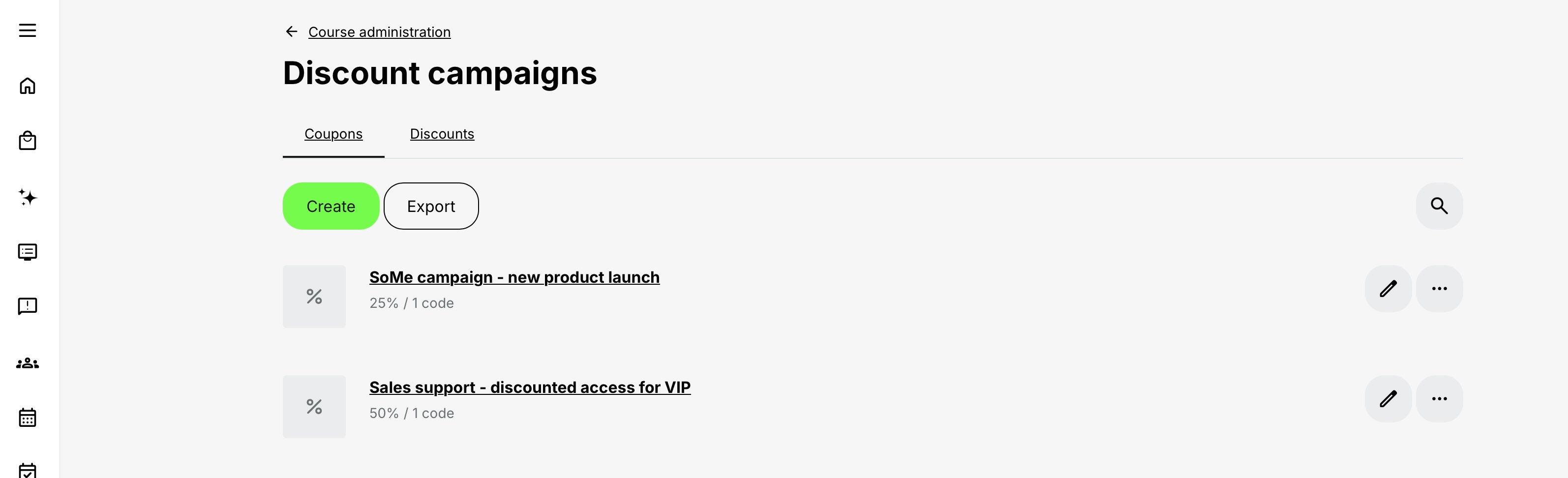
The overview contains two tabs:
- Coupons
- Discounts
Each tab has:
- Its own list of existing records
- Search or list-navigation controls
- A contextual Create action
- Actions for opening or managing existing records
The Create action follows the active tab. Select the correct tab before creating a record.
The Coupons tab also provides Coupon-specific actions such as export.
Create a Discount campaign
- Open Course Administration → Discount campaigns.
- Select the Discounts tab.
- Review the list to confirm that a similar campaign does not already exist.
- Select Create.
- Enter an administrative title.
- Enter the discount percentage.
- Set an expiration when the campaign should end automatically.
- Select whether the campaign applies to any Training Activity or only to specific Training Activities.
- Define the intended audience.
- Select Create.
The new campaign appears in the Discounts list. It is managed independently of Coupons.
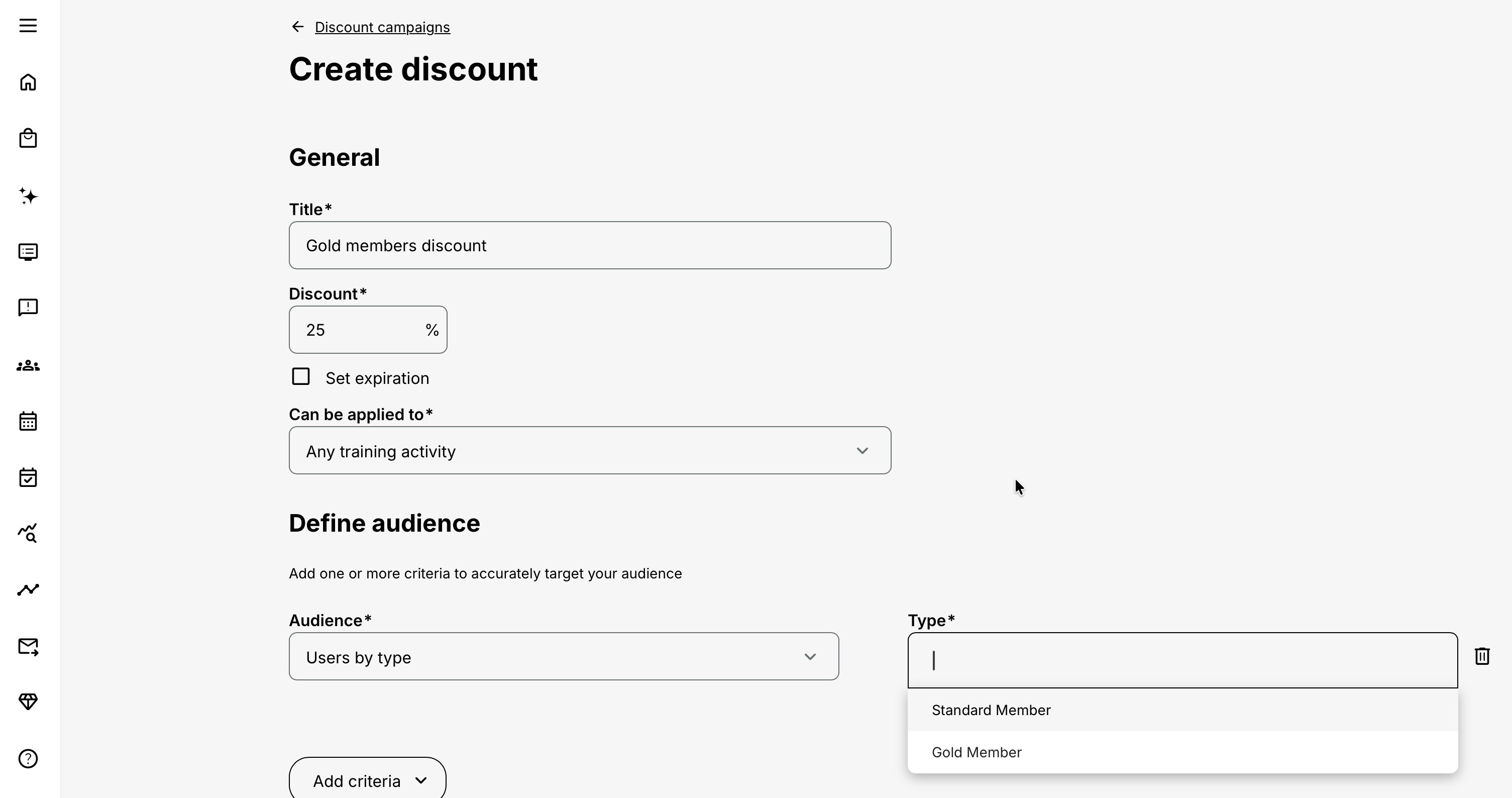
Discount campaign setting reference
| Setting | What it controls | Guidance |
|---|---|---|
| Title | Administrative name shown in the Discounts list | Include the owner, audience, purpose, period and value |
| Discount | Percentage reduction for the eligible Training Activity price | Confirm commercial approval before creation |
| Set expiration | Ends the campaign at the configured date and time | Communicate the deadline with a clear time-zone expectation |
| Can be applied to | Any Training Activity or selected Training Activities | Use selected scope unless the offer is genuinely broad |
| Define audience | Determines which participants qualify | Add the minimum criteria needed to express the intended audience |
Define the Discount campaign audience
The Discount campaign form supports audience criteria such as:
- Role
- Language
- Job function
- Department
- Type
- Category
- Organizations
Use criteria that match information maintained reliably for the intended participants.
For example, an organization criterion is more dependable than a job-function criterion if job functions are not consistently populated.
Test:
- A participant who should qualify
- A participant who should not qualify
- Users with several organization memberships
- Users in relevant suborganizations
- Users with incomplete profile information
- The exact Training Activities included in the campaign
Avoid creating audience logic so broad that unintended participants receive the discount.
Configure the campaign’s Training Activity scope
Choose between:
- Any Training Activity
- Specific Training Activities
Use Any Training Activity only when the campaign is intended to affect the complete applicable catalogue. Other administrators may publish new paid Training Activities while the campaign is active.
Use Specific Training Activities for controlled offers. Select every relevant activity explicitly, including separate:
- Languages
- Product editions
- Delivery dates
- Linked or repeated activities
- Regional offerings
- Cloned activities
Selecting one Training Activity does not prove that every related or repeated activity is included.
Create Coupons
- Open Course Administration → Discount campaigns.
- Select the Coupons tab.
- Review the existing Coupon list.
- Select Create.
- Enter an administrative title.
- Select Percentage or Fixed price.
- Enter the percentage or fixed currency values.
- Select the usage model.
- Enter the required code, code quantity or usage limit.
- Select whether the Coupon applies to any Training Activity or specified Training Activities.
- Set an expiration when the Coupon should no longer be accepted.
- Select Create.
- Open the resulting record and confirm the generated or shared code information.
- Test the Coupon through the intended participant checkout.
The new record appears in the Coupons list.
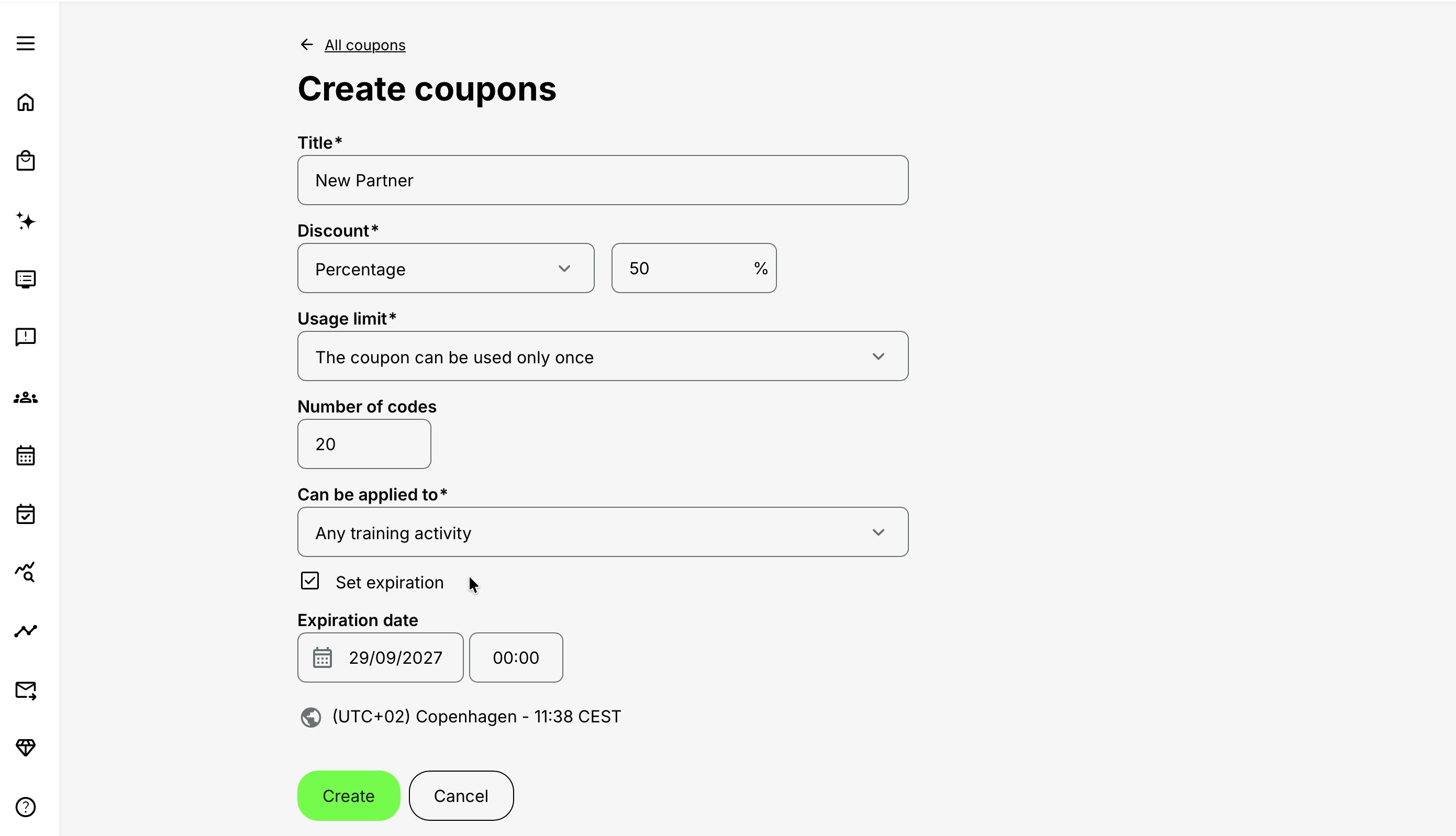
Coupon setting reference
| Setting | What it controls | Guidance |
|---|---|---|
| Title | Administrative name shown in the Coupons list and reporting context | Use a meaningful and governed name |
| Discount type | Percentage or fixed-price Coupon | Select the model approved for the offer |
| Percentage | Percentage deducted from the eligible Training Activity price | Test combinations with other applicable discounts |
| Fixed price | The price that should apply in each configured regular currency | Enter and test every currency that will be offered |
| Usage limit | One-time codes, unlimited shared use or limited shared use | Select according to how the code will be distributed |
| Number of codes | Number of generated codes in a one-time batch | Up to 1,000; every code can be redeemed once |
| Coupon ID/code | Shared code used for unlimited or limited models | Must be unique and cannot be changed after creation |
| Maximum uses | Total redemptions permitted for a limited shared code | This is a global limit, not a per-user allowance |
| Can be applied to | Any Training Activity or selected Training Activities | The checkout activity must be in scope |
| Set expiration | Stops the Coupon being accepted after the configured time | Coordinate the platform value with campaign communication |
Choose between percentage and fixed price
Percentage Coupon
A percentage Coupon reduces the eligible Training Activity price by the configured percentage.
Example:
| Activity price | Coupon | Discount | Resulting activity price |
|---|---|---|---|
| EUR 200 | 25% | EUR 50 | EUR 150 |
Percentage Coupons can be practical when the same relative reduction should apply across different activity prices or currencies.
Fixed-price Coupon
A fixed-price Coupon gives the eligible Training Activity the configured price for each supported regular currency shown in the form.
Example:
| Activity price | Fixed Coupon price | Resulting activity price |
|---|---|---|
| EUR 200 | EUR 125 | EUR 125 |
A fixed-price Coupon is not the same as “EUR 125 off.” It sets the applicable activity-price value to EUR 125.
Enter a deliberate amount for every currency in which the offer will be used. A fixed value in one currency does not automatically define the commercial value for another currency.
Before distribution, test:
- Every intended currency
- The exact Training Activities
- Organization discounts
- Taxes
- Additional Products
- Zero and nonzero final totals
- Every intended payment method
Choose the Coupon usage model
Eurekos supports three usage models.
| Usage model | Code structure | Usage rule | Suitable for |
|---|---|---|---|
| Can be used only once | A batch of generated codes | Each individual code can be redeemed once | Named recipients, vouchers, customer recovery and controlled complimentary access |
| Can be used an unlimited number of times | One shared code | The same code can be redeemed without a total-use limit while valid | Public promotions, newsletters and broad partner communication |
| Can be used a certain number of times | One shared code | The code can be redeemed until its total-use limit is reached | Partner allocations, tender limits and limited launch campaigns |
The usage model controls code consumption. It does not control who may see or enroll in the Training Activity.
Create unique one-time codes
Select The Coupon can be used only once when every distributed code should permit one redemption.
Enter the required number of codes, up to 1,000.
Use this model when:
- Every recipient should receive a different code.
- A complimentary offer should be distributed as controlled vouchers.
- Support must be able to suspend one exposed code without closing the complete batch.
- The approved audience has a known size.
- Person-level distribution records are maintained outside the Coupon where permitted.
“One-time” means one use per generated code. It does not mean that the entire Coupon batch has only one redemption.
Generated codes are not automatically identity-bound. Anyone who obtains an unused code may attempt to use it.
Suspend an individual code
An individual code in a one-time batch can be suspended without disabling the other codes.
Use suspension when:
- A code was sent to the wrong recipient.
- A code was published accidentally.
- A voucher was lost.
- A code is suspected of being compromised.
- A governed replacement was issued.
Before suspending or replacing a code:
- Confirm the exact code.
- Review its existing use.
- Check the related Transaction.
- Record the reason for the action.
- Verify that the suspended code is rejected.
Create an unlimited shared code
Select The Coupon can be used an unlimited number of times when one code should be distributed broadly without a total redemption cap.
Use it for:
- Public promotions
- Social-media campaigns
- Newsletters
- Conferences
- Broad partner communities
Unlimited refers to the total number of uses. It does not provide unrestricted access to the catalogue or Training Activity.
Treat a shared code as public once it has been distributed through an uncontrolled channel.
Create a limited shared code
Select The Coupon can be used a certain number of times when everyone should enter the same code but the total number of redemptions must be limited.
Configure:
- A unique Coupon ID
- The maximum total number of uses
Use it for:
- A partner allocation of 50 discounted enrollments
- The first 100 registrations
- A tender containing a fixed number of discounted places
- A product launch with a controlled commercial budget
The usage limit applies globally to the shared code. It is not a separate allowance for each participant or organization.
If named recipients must each receive a protected allocation, use individual one-time codes and appropriate enrollment controls.
Configure the Coupon ID
The Coupon ID is the shared code used for unlimited and limited-use Coupons.
Choose a code that is:
- Easy to type
- Easy to communicate
- Distinct from other live offers
- Free from ambiguous characters where possible
- Not personally identifying
- Not a confidential agreement number
- Appropriate if shown in support evidence or transaction documentation
The Coupon ID cannot be changed after creation. Create a replacement Coupon when a different code is required.
Configure Coupon scope
Choose whether the Coupon applies to:
- Any Training Activity
- Specific Training Activities
Use broad scope only for a genuinely platform-wide offer. Consider that newly published activities may also become eligible.
For controlled commercial offers, select the exact Training Activities. Check separate languages, dates, editions, regions, linked deliveries and clones.
Coupon scope determines where the code can affect price. It does not make the activity visible or override enrollment rules.
Configure expiration
Set an expiration when an offer should close automatically.
Expiration is useful for:
- Seasonal campaigns
- Early-bird periods
- Tender validity
- Partner agreements
- Product launches
- Customer-recovery offers
Communicate both the date and time zone.
Test an unused Coupon:
- Shortly before expiration
- After expiration
- After an approved extension
- With a limited code that still has uses available
Changing expiration does not restore a redeemed code, add uses to a limited Coupon or reactivate a suspended individual code.
How a participant receives a Discount campaign
For a Discount campaign, Eurekos evaluates:
- Whether the Training Activity is in scope
- Whether the campaign is still valid
- Whether the participant matches the audience criteria
- Which other pricing and checkout conditions apply
The participant does not enter a campaign code.
Test with the exact participant profile because organization membership, role, language, job function, department, type or category can change whether the participant qualifies.
How a participant uses a Coupon
- The participant opens an eligible paid Training Activity.
- The participant starts an available enrollment or checkout flow.
- Eurekos determines the applicable regular-currency price.
- The participant enters the Coupon code.
- Eurekos validates the code, usage model, remaining uses, activity scope and expiration.
- The percentage or fixed price is applied to the Training Activity component.
- Other applicable pricing rules are evaluated.
- Additional Products retain their own prices.
- Tax and payment are processed according to Commerce configuration.
- The resulting amount appears in the checkout and order context.
- The completed use appears in Coupon monitoring and the relevant Transaction records.
A valid Coupon cannot bypass:
- Storefront visibility
- Organization scope
- Self-enrollment availability
- Available-from dates
- Registration deadlines
- Enrollment restrictions
- Prerequisites
- Participation approval
- Seats
- Organization seat allocations
- Waiting-list behavior
- Required checkout fields
- Payment requirements
- Identity validation
Account for organization discounts and combined pricing
For a percentage Coupon, an applicable organization discount can increase the total percentage applied to the Training Activity price.
Example:
| Calculation | Percentage or amount |
|---|---|
| Organization discount | 10% |
| Percentage Coupon | 20% |
| Combined activity discount | 30% |
| EUR 100 activity after discount | EUR 70 |
This example does not apply directly to a fixed-price Coupon.
When a Discount campaign, organization discount, special price or Coupon can affect the same participant and Training Activity, test the exact checkout. Do not assume precedence or stacking from the names of the pricing mechanisms.
Test combinations that approach or reach a zero activity price.
Payment methods
A discount changes the eligible activity amount. It does not:
- Enable a disabled payment method
- Add support for an unsupported currency
- Guarantee authorization or capture
- Store payment-card information in Eurekos
- Override BankID or another required validation
- Bypass invoice or payment-provider configuration
A payment method may no longer be relevant when the resulting amount is zero. Test both zero and nonzero outcomes.
Free Training Activities
A Coupon field is not needed when the Training Activity is already free because there is no regular activity price to replace or reduce.
A paid Training Activity reduced to zero through a discount still begins with a paid-price context. Verify taxes, required products, order records and confirmation documents before communicating that the complete enrollment is free.
Virtual Credits
Coupons cannot be combined with a price paid in Virtual Credits.
When both regular currency and Virtual Credits are available:
- Use the Coupon in an eligible regular-currency checkout.
- Use Virtual Credits without the Coupon when the credit route is selected.
A Coupon does not reduce a participant’s Virtual Credit requirement or restore an organizational credit balance.
Additional Products are not discounted
Coupons and organization discounts affect the Training Activity price, not the price of Included or Optional Additional Products.
Example:
| Order component | Calculation | Amount |
|---|---|---|
| Training Activity | Regular price | EUR 200 |
| Percentage Coupon | 25% of EUR 200 | –EUR 50 |
| Discounted Training Activity | EUR 150 | |
| Optional manual | Not discounted | EUR 40 |
| Order before applicable tax | EUR 190 |
For a fixed-price Coupon, the Training Activity component is replaced by its configured fixed price, while the Additional Product retains its own price.
Describe the offer as “25% off the training” or “training for EUR 125,” not as a discount on the entire order when products remain chargeable.
An Optional Product purchased later creates a separate Transaction and does not inherit a Coupon used during enrollment.
Seats, waiting lists and approval
Discounts do not create capacity.
A Coupon or Discount campaign does not:
- Reserve a seat
- Increase the seat limit
- Satisfy an approval request
- Prevent a participant from entering the waiting list
- Reopen registration
- Extend the registration deadline
Coupon usage limits and Training Activity seat limits are separate quantities.
Creating 500 valid codes for an Event with 50 seats does not create 500 places.
Distribute Coupon codes safely
| Coupon model | Distribution approach | Main control |
|---|---|---|
| Individual one-time codes | Send one code to each intended recipient | Do not publish the complete unused batch; suspend disclosed codes |
| Limited shared code | Share with the intended audience and explain the total limit | Monitor use as the limit approaches |
| Unlimited shared code | Use where forwarding is acceptable | Restrict activity scope and expiration even when total use is unlimited |
Do not place personal, confidential or contractual information in the Coupon ID.
When attribution matters, create separate Coupons for separate channels instead of distributing one code everywhere.
Monitor Discount campaigns
Use the Discounts tab to:
- Search the list
- Identify active campaign records
- Review title and percentage
- Open or edit an existing campaign
- Check scope, audience and expiration
- Confirm that obsolete or overlapping campaigns are not unintentionally active
Review audience-based campaigns when:
- Organizational structures change
- Profile data changes
- New Training Activities are published
- An offer is extended
- The campaign owner changes
- A participant receives an unexpected price
Monitor Coupon usage
Use the Coupons tab to:
- Search existing Coupons
- Open a Coupon record
- Review code quantity or total-use limit
- Compare use with expiration
- Inspect generated codes
- Suspend an individual code where supported
- Export Coupon information or usage
- Reconcile the offer with Transactions
Recommended review questions include:
- How many codes were generated?
- How many were distributed?
- How many were redeemed, unused, expired or suspended?
- Which Training Activities received the Coupon price?
- Which participants and organizations used it?
- Did a limited code reach its cap?
- Was the code used outside its intended channel?
- Does the recorded Transaction match the approved offer?
Verify Transactions and order documents
Every completed enrollment route should be reconciled with its Transaction context.
Review:
- Whether a Transaction was created
- Transaction status
- Original activity price
- Applied discount
- Resulting activity price
- Additional Product prices
- Currency
- Tax
- Payment method
- Payment-provider reference
- Coupon information
- Confirmation and invoice information
A valid Coupon does not guarantee successful payment.
When a participant reports a consumed code after a failed checkout:
- Locate the Coupon use.
- Locate the corresponding Transaction.
- Review status and provider references.
- Confirm whether a signup was created.
- Apply the organization’s approved refund and replacement process.
Do not issue a replacement one-time code until the original use has been investigated.
Change a live Discount campaign
Changing a Discount campaign can affect participants who already qualify.
Before changing percentage, scope, audience or expiration:
- Confirm commercial approval.
- Identify the affected participants and Training Activities.
- Review other active pricing rules.
- Test representative participants before and after the change.
- Communicate changes to campaign and support owners.
- Preserve an external record of the original commercial decision when required.
Create a new campaign when the revised offer has a different purpose, audience or commercial promise.
Change a live Coupon
Coupon changes can affect codes already distributed and checkouts already in progress.
| Change | Guidance |
|---|---|
| Coupon ID | The code cannot be changed. Create a replacement Coupon. |
| Expiration | Communicate the revised deadline and test an unused code. |
| Individual generated code | Review its use before suspension or replacement. |
| Discount value or type | Consider distributed codes to represent an existing commercial promise; create a new Coupon for a materially different offer. |
| Usage limit | Review existing use and the communicated allocation before changing it. |
| Activity scope | Identify distributed but unused codes and test every affected activity. |
| Currency value for fixed price | Verify all supported currencies and any published pricing before changing it. |
Common designs
| Business need | Recommended mechanism | Why |
|---|---|---|
| Give all members of selected partner organizations 15% off selected training | Discount campaign with organization audience criteria | No code is required and the audience is defined in the campaign |
| Give French-speaking technicians 20% off a certification path | Discount campaign with language and job-function criteria | Eligibility follows maintained profile information |
| Publish a launch code on social media | Unlimited shared Coupon with selected activity scope and expiration | One memorable code supports broad distribution |
| Give a distributor 75 discounted registrations | Limited shared Coupon with 75 uses | The Coupon controls the total redemption allocation |
| Give 100 named customers one complimentary registration each | 100 one-time Coupons with a 100% value | Each code has its own redemption and suspension state |
| Offer a workshop for a fixed EUR and USD price | Fixed-price Coupon with configured currency values | The resulting activity price is controlled explicitly per currency |
| Recover from a service issue with one controlled offer | One one-time Coupon with narrow activity scope and short expiration | The offer can be replaced or suspended independently |
| Compare newsletter and social performance | Separate shared Coupons for each channel | Usage and exports remain attributable |
Verify the configuration
Use representative accounts and real delivery routes.
| Check | Expected evidence |
|---|---|
| Correct tab and record type | The offer was created as a Discount campaign or Coupon according to the intended participant journey |
| Value | The percentage or fixed currency values match the approved offer |
| Activity scope | Only the intended Training Activities receive the discount |
| Audience campaign | A qualifying participant receives the campaign and a nonqualifying participant does not |
| Coupon redemption | Valid, expired, exhausted and out-of-scope codes produce the intended result |
| Other pricing | Organization discounts and other possible pricing mechanisms produce an approved result |
| Additional Products | Product prices remain unaffected |
| Virtual Credits | Coupon use remains separate from the Virtual Credit route |
| Enrollment controls | Visibility, restrictions, approval, seats and deadlines still apply |
| Currencies | Every intended currency produces the expected price |
| Payment | Zero and nonzero totals use the correct checkout behavior |
| Records | Transaction, confirmation, invoice and Coupon usage contain the expected evidence |
| Operations | Support can locate the offer, investigate use and suspend or replace a code appropriately |
Troubleshooting
| Problem | What to check |
|---|---|
| Discount campaigns is missing from Course Administration | Confirm the user’s role, organization scope and platform configuration. |
| The wrong creation form opens | Return to the overview and select the correct Coupons or Discounts tab before selecting Create. |
| A Discount campaign does not apply | Check expiration, Training Activity scope and every configured audience criterion against the exact participant. |
| An unintended participant receives a campaign | Review broad or alternative audience criteria, organization membership and incomplete grouping logic. |
| A newly published activity receives an unexpected campaign discount | Check whether the campaign applies to any Training Activity rather than selected activities. |
| A Coupon cannot be saved | Check title, discount type and value, usage model, code or quantity, activity scope and expiration. |
| A fixed-price Coupon is missing a currency | Review the currency fields displayed by the form and configure every currency required by the offer. |
| The Coupon ID is already used | Choose another unique code. |
| The Coupon ID is wrong | Create a replacement Coupon; the existing ID cannot be renamed. |
| The participant cannot find the Coupon field | Confirm that the participant reaches an eligible regular-currency checkout for a paid Training Activity. |
| The Coupon is invalid | Check the exact characters, expiration, suspension, usage limit and activity scope. |
| The Coupon works for one activity but not another | Confirm that each activity record is explicitly in scope. |
| The Coupon reached its limit too early | Export usage and remember that the limited shared-code value is a global total. |
| A one-time batch has several redemptions | Each generated code can be redeemed once; the batch can therefore have one redemption per code. |
| A one-time code was used by the wrong person | The code is not identity-bound. Review the Transaction and suspend any other exposed codes. |
| The resulting percentage is larger than expected | Check organization discounts and other active pricing rules. |
| A fixed-price Coupon produces an unexpected total | Confirm the currency-specific Coupon value, Additional Products, tax and other pricing rules. |
| An Additional Product was not discounted | This is expected; it retains its own price. |
| A 100% Coupon still leaves an amount due | Check Additional Products, tax and other order components. |
| The Coupon cannot be combined with Virtual Credits | Use a regular-currency checkout or select Virtual Credits without the Coupon. |
| Card payment fails after the Coupon is accepted | Coupon validation and payment authorization are separate. Inspect the Transaction and provider response. |
| The participant enters the waiting list | The discount does not create capacity. Check seats and organization allocations. |
| Enrollment still requires approval | The discount does not bypass the approval process. |
| The participant cannot see the Training Activity | Check Storefront visibility, organizations, availability and enrollment settings. |
| Uses remain after registration closes | Coupon availability and registration availability are separate. |
| A cancelled enrollment does not restore a code | Do not assume restoration. Reconcile Coupon use and Transaction history before replacement. |
| Coupon export and Transaction counts differ | Align date range, Coupon, Training Activity, organization and Transaction status. |
| A shared code was published accidentally | Review use immediately, constrain or replace the Coupon, and notify the responsible commercial and support owners. |
| A Coupon still works after the advertised end | Check the stored expiration, time zone and whether it was extended. |
FAQ
-
Are Coupons fixed amounts or percentages?
Coupons can use either a percentage discount or a fixed price. A percentage reduces the eligible Training Activity price by the configured rate. A fixed-price Coupon sets the resulting Training Activity price for each configured regular currency shown in the form.
-
What are the three Coupon types?
A batch of unique codes that can each be used once, one shared code with unlimited uses, and one shared code with a defined total-use limit.
-
What does “used only once” mean?
Each generated code in the batch can be redeemed once. It does not mean the entire batch has only one redemption.
-
How many unique one-time codes can I create?
Up to 1,000 in one Coupon definition.
Create additional governed Coupon batches when the campaign requires more than the per-definition maximum. Use distinct titles so reporting remains understandable.
-
Is a shared limited-use Coupon limited per participant?
No. The number is the total use limit for the code. Anyone with it can consume one of the remaining uses through an eligible checkout.
-
Can I customize the code?
Yes, for the single-code unlimited and limited-use models. The code must be unique.
-
Can I change the Coupon ID later?
No. The ID cannot be changed after creation. Create a replacement Coupon when a different code is required.
-
Is a one-time code assigned to a named user?
Not merely by generating or distributing it. It can be used once by whoever possesses it and completes an eligible checkout. Apply access and enrollment restrictions separately when identity matters.
-
Can I suspend one code without closing the batch?
Yes. An individual generated code can be suspended while other codes in the batch remain available.
-
Can a Coupon apply to several Training Activities?
Yes. Select any number of specific activities or choose all Training Activities.
-
Do linked or repeated activities inherit Coupon eligibility?
Do not assume so. They are distinct activity records. Review and select every eligible delivery explicitly unless the Coupon intentionally applies to all activities.
-
Does the Coupon make an activity visible in the catalog?
No. Visibility, organization scope, and self-enrollment are controlled by the Training Activity and Storefront.
-
Can a Coupon bypass an enrollment restriction or approval?
No. It changes the eligible price only. The user must still meet restrictions and complete any approval flow.
-
Does a Coupon reserve a seat?
No. Capacity and waiting-list rules still apply.
-
Can a Coupon be used after registration closes?
No normal checkout can proceed when the activity is unavailable for enrollment. Remaining Coupon uses do not keep registration open.
-
Can I set an expiration time as well as a date?
Yes. The Coupon can expire at a defined date and time. Communicate the time zone clearly for global audiences.
-
Can I extend the expiration date?
The Coupon overview supports expiration changes where permitted. After extending it, test checkout and communicate the revised deadline.
-
Does a Coupon work for a free Training Activity?
No Coupon option is shown when the activity is already free.
-
Can a 100% Coupon make a paid activity free?
It can reduce the eligible Training Activity price by 100%. Additional Products remain undiscounted, and tax/order behavior should be confirmed in a test checkout.
-
Does the Coupon work in every currency?
Percentage Coupons apply the configured rate to the eligible Training Activity price in the currency shown at checkout. Fixed-price Coupons require a separate resulting price for each configured regular currency shown in the form. Verify the Training Activity price and test every currency included in the offer.
-
Can a Coupon be used with any payment method?
It can be applied with enabled regular payment methods. It does not enable a disabled method or override a payment provider's currency and authorization rules.
-
Can I use a Coupon with Virtual Credits?
No. Coupons and Virtual Credits cannot be combined.
-
What happens if the participant belongs to an organization with a discount?
Other eligible pricing rules can affect the final Training Activity price. A percentage Coupon and an organization discount may increase the total discount, while fixed-price Coupons behave differently. Test the exact participant, Training Activity, currency and checkout route; do not assume the order or calculation from the rule names alone.
-
Does the Coupon discount Additional Products?
No. It applies only to the Training Activity price.
-
Where can I see who used a Coupon?
Open Course Administration → Discount campaigns and select the Coupons tab. Open the Coupon to review its codes and usage, or use the Coupons export. Reconcile completed redemptions with the relevant Transactions when you need price, participant, organization, currency or payment evidence.
-
Can I export Coupon usage?
Yes. Export all Coupon usage or the history for an individual Coupon to a spreadsheet from the overview/actions.
-
Where does the participant see the discount?
It appears during checkout and in enrollment confirmation and invoice information where applicable.
-
Does every Coupon use create a Transaction?
Checkout/enrollment creates a Transaction, even when the resulting enrollment is free. Use Transactions to reconcile the Coupon, price, payment, and signup.
-
Is payment-card information stored with the Coupon record?
No. Payment-card information is managed by the payment provider, not stored in Eurekos Coupon or Transaction details.
-
Can I reuse one code for different campaigns?
A shared Coupon ID must be unique, so the same code cannot be used to create another Coupon definition. One existing Coupon can support more than one promotion only while its scope, value, usage limit and expiration remain appropriate, but that weakens attribution. Create a separate Coupon and code for each distinct campaign when reporting or control matters.
-
Should I use an unlimited code for a private customer agreement?
Only if separate organization/access controls protect the offer and unlimited use is contractually acceptable. Otherwise use a limited shared code or unique one-time codes.
-
Does deleting or cancelling an enrollment automatically restore a use?
Do not assume it does. Inspect Coupon usage and the corresponding Transaction, then follow the organization's approved refund and replacement-code process.
-
What is the difference between a Discount campaign and a Coupon?
A Discount campaign applies a percentage automatically when a participant matches its audience and Training Activity criteria. A Coupon requires a code at an eligible checkout and can use either a percentage discount or a fixed price. They are separate records in the Discounts and Coupons tabs; a Discount campaign does not issue Coupons.
-
When should I use a Discount campaign instead of a Coupon?
Use a Discount campaign when a percentage should be applied automatically to a defined audience and participants should not enter a code. Use a Coupon when you need a distributed code, a limited number of redemptions, individual one-time codes, a shared code or a fixed price.
-
Which audience criteria can a Discount campaign use?
A Discount campaign can use criteria such as Role, Language, Job function, Department, Type, Category and Organizations. Choose criteria based on profile and organizational data that is maintained reliably, then test both qualifying and nonqualifying participants.
-
Does a participant enter a code for a Discount campaign?
No. Eurekos evaluates the participant, the Training Activity scope, the configured audience criteria and the campaign’s validity automatically. The participant enters a code only when using a Coupon.
-
Can a Discount campaign use a fixed price?
No. Discount campaigns use a percentage. Use a fixed-price Coupon when the Training Activity should be offered at a defined resulting price, and configure every regular currency required by the offer.
-
Can Discount campaigns and Coupons be limited to selected Training Activities?
Yes. Each can apply to any Training Activity or to a selected set. For controlled offers, select every eligible activity explicitly; linked, repeated, cloned, regional and language-specific activities are separate records unless the offer intentionally applies to all activities.
-
Do Discount campaigns or Coupons grant access to a Training Activity?
No. They affect the eligible price only. Storefront visibility, organization scope, self-enrollment, availability dates, registration deadlines, prerequisites, restrictions, approval, seats and waiting-list rules continue to apply.