Reselling Gateway - Article
Summary
Reselling Gateway helps a training provider deliver one governed program through many independently managed private groups, without having to create and coordinate every group centrally.
The provider prepares a reusable Training Activity, while a customer, partner, facilitator, or local group lead starts a private delivery, invites the participants, and coordinates the group. Groups gain local autonomy while the provider retains control of the program, reporting, and completion evidence.
The delivery can be paid, free, centrally funded, invoiced, or reimbursed later. Reselling Gateway provides the administrative and learning-delivery structure without requiring a particular commercial model.
In this article you will learn:
- When Reselling Gateway is the appropriate delivery model
- Which platform and activity settings must be enabled
- What the initiator sees during enrollment or checkout
- How dates and time zones are selected for connected Calendar events
- What is created after successful completion of the process
- Why the initiator and Transaction appear on the clone rather than the original
- How invitation-only enrollment and email matching work
- What happens after an incomplete or cancelled enrollment
- Which optional permission to edit connected Calendar events the group lead can receive
- How to operate, audit, and troubleshoot private deliveries
What Reselling Gateway helps you achieve
Reselling Gateway turns one centrally governed Training Activity into repeatable, privately managed group deliveries. It is intended for providers that want to serve many separate customers, partners, teams, member groups, or local communities without requiring their own administrators to create and operate every cohort manually.
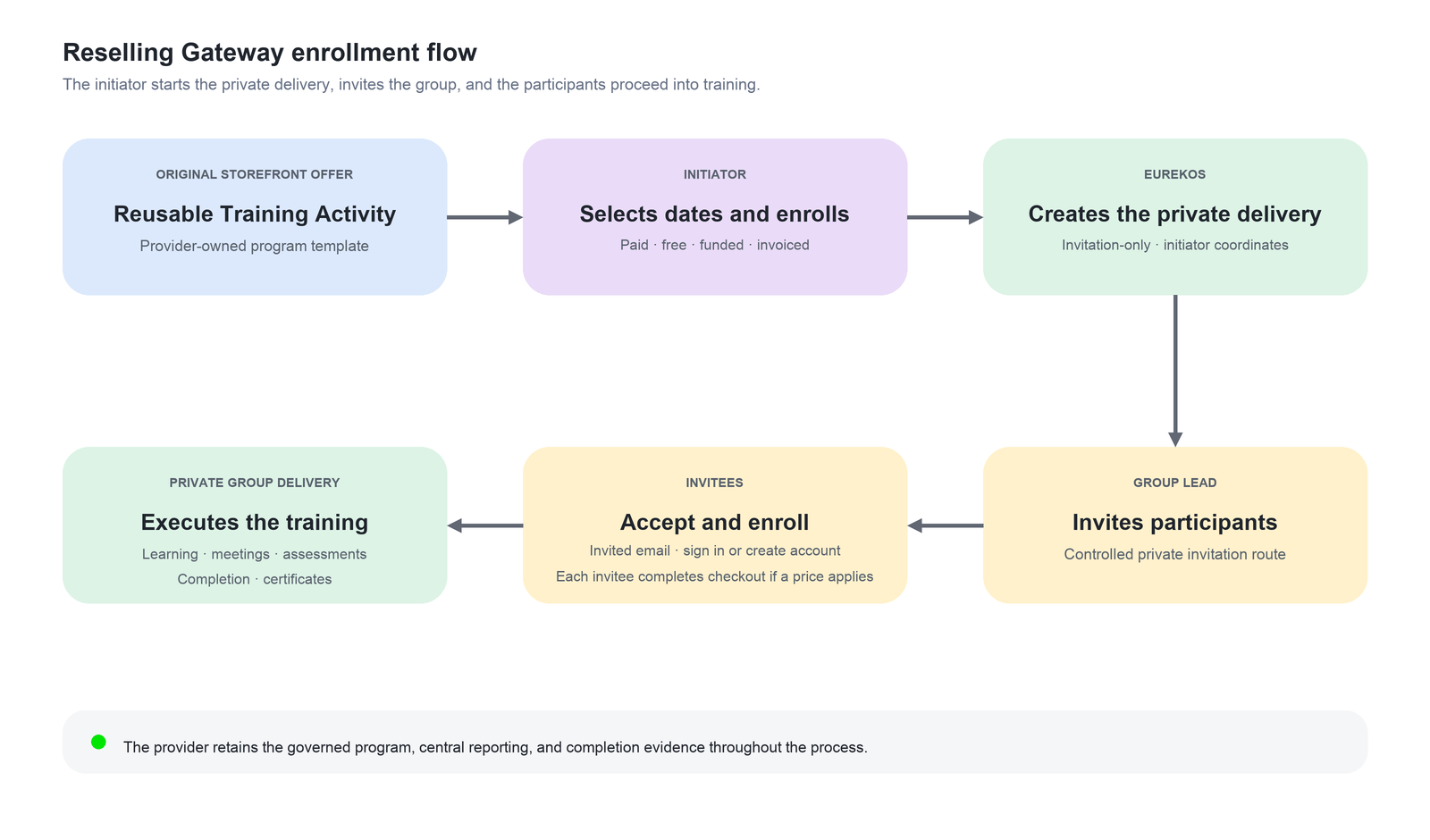
The original Training Activity acts as the provider’s reusable program template. A group lead starts a private delivery through the configured enrollment or checkout route. Eurekos creates a closed clone, moves the initiating participant and associated Transaction record to it, gives that person Contact Manager capability, and allows them to invite the people who should participate.
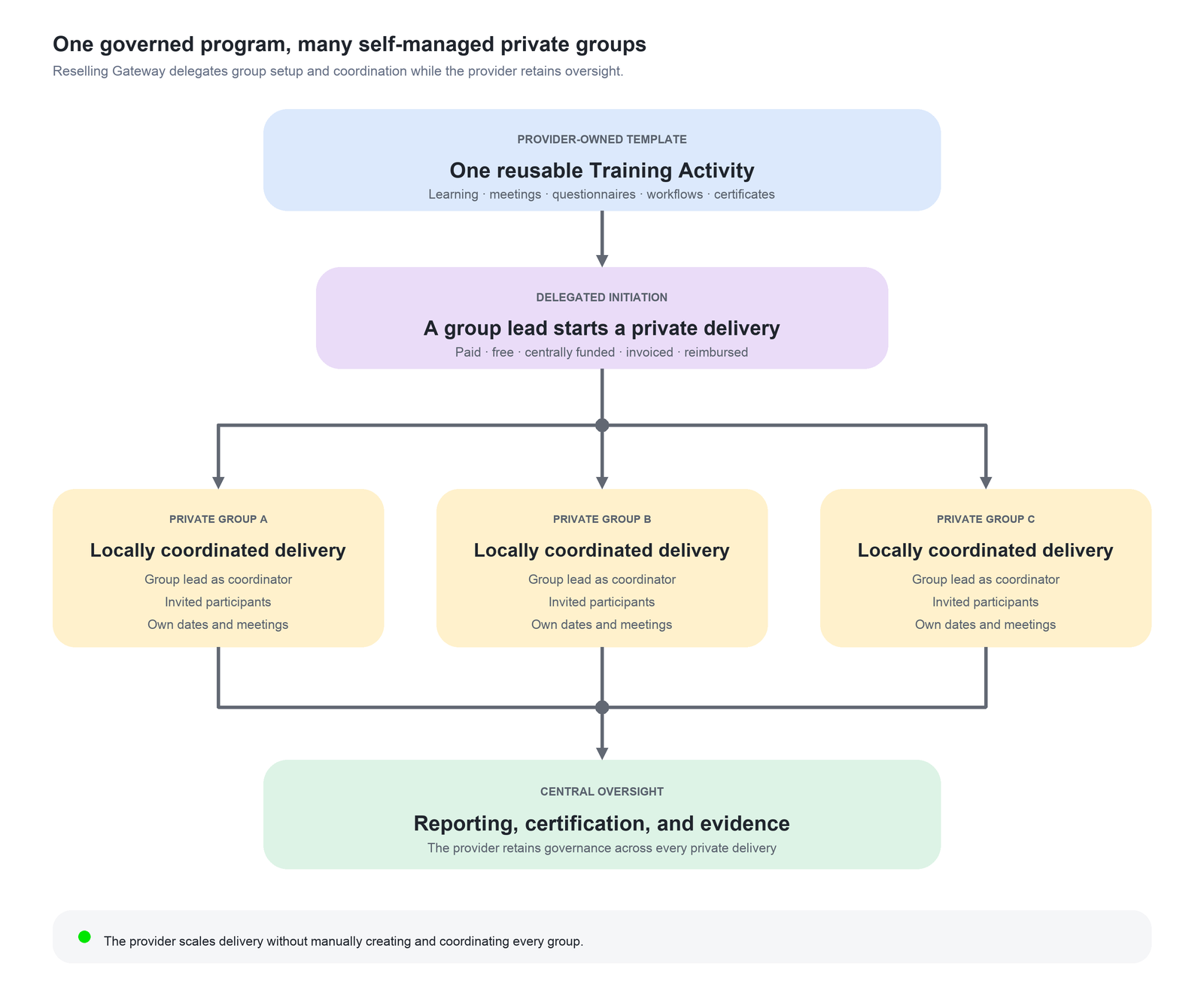
The process does not have to involve an immediate payment—or any payment at all. Reselling Gateway controls how the private delivery is created and delegated; it does not prescribe how the program is funded.
Depending on the surrounding commercial and administrative model:
- The group lead may pay when starting the delivery.
- Each invited participant may complete their own payment.
- An organization may fund the program centrally.
- Payment may be handled later through invoicing, reimbursement, or another approved process.
- The activity may be free because the provider’s purpose is to facilitate and document the group process.
- A zero-value Transaction may still be created as the platform record for enrollment without representing money received.
Invited participants join through the controlled invitation route. The group then works through the program inside its own private delivery, while the provider retains the standardized learning design, central oversight, reporting, and completion evidence.
This creates a delegated operating model:
| Responsibility | Typical owner | What this achieves |
|---|---|---|
| Program design and governance | Training provider | One approved template can contain Course modules, Event modules, Assignments, questionnaires, workflows, certificates, and other required learning components. |
| Starting a private delivery | Customer, partner, manager, facilitator, or local group lead | The person initiates the delivery without asking the provider to create a cohort manually. |
| Group formation | Initiator acting as Contact Manager | The initiator invites the relevant participants into the closed delivery instead of making it publicly self-enrollable. |
| Local coordination | Initiator or another agreed coordinator | The group can coordinate its participants and, where permitted, the dates, meetings, attendance, or other details of connected Calendar events. |
| Enrollment and funding | Participants, their organization, the initiator, or an external process | The delivery can support individual payment, central funding, later invoicing or reimbursement, or a completely free participation model. |
| Learning and documentation | Participants and the private group | The group completes the defined learning, reflection, assessment, meetings, or improvement process and retains the required evidence. |
| Oversight and reporting | Training provider | The provider can monitor delivery and completion across private groups while remaining the authoritative program owner. |
Despite its name, Reselling Gateway does not have to represent conventional resale in which a reseller buys places and sells them onward. Its defining purpose is the delegation of a private delivery: a customer-side or group-side coordinator starts and manages a separate instance of the provider’s standardized program.
For example, a professional association may provide a standardized improvement program to thousands of small independent practices or local professional groups. A practice or group lead starts a private delivery, selects or coordinates the required meeting dates, and invites colleagues. The group then works through self-reflection, assessment, collaborative improvement, and documented learning.
Participation may be free, centrally funded, paid individually, or reimbursed after completion. A certificate or other completion evidence can support reimbursement, accreditation, regulatory documentation, or professional recognition without making payment the purpose of the learning workflow.
The association does not have to create and administer every local group itself. It maintains the program template, learning requirements, certification, and reporting framework, while each group manages its own delivery.
The same model can be applied to:
- Professional or membership associations supporting many autonomous local groups
- Partner networks delivering a centrally governed certification program
- Franchise or dealer organizations coordinating local training
- Customer-managed onboarding or implementation programs
- Distributed quality-improvement and compliance initiatives
- Publicly or centrally funded development programs
- Training providers repeatedly offering complex blended programs as private cohorts
The important requirement is that each initiation should create a genuinely separate delivery with its own participants, coordination, dates, Transaction record, and administration. If the person only needs to join an existing delivery or invite others into an already established activity, use another enrollment or invitation model.
Choose Reselling Gateway or another model
| Requirement | Use |
|---|---|
| One person enrolls themselves in a standard delivery | Normal Self enrollment or checkout |
| A person applies and an approver decides | Participation Approval |
| A prospect asks the provider to arrange a delivery | On-demand Training Request |
| A manager or partner receives a campaign and invites people into an existing activity | Promotion and Contact Manager invitation |
| A person starts a new private delivery and becomes its invitation manager | Reselling Gateway |
| Participants choose among existing published dates | Repeated activities or Existing Training options |
Reselling Gateway is not simply a quantity selector or a way to reserve several places. Completing the configured enrollment or checkout creates a new Training Activity.
Use it only when that separate private delivery record is part of the intended operational design.
Understand the original and the clone
The workflow uses two distinct activities:
| Activity | Purpose | Storefront and signup behavior |
|---|---|---|
| Original activity | Reusable program template and Storefront offer | Remains available and can be used repeatedly to start new private deliveries |
| Cloned activity | One group’s private delivery | Self enrollment is disabled; the initiator and invited participants use the controlled invitation route |
After successful completion of the configured enrollment or checkout:
- The initiator appears as a participant only in the cloned activity.
- The initiator’s signup Transaction is transferred to the clone.
- The clone receives a Reselling Gateway label and a reference to its parent or original activity.
When investigating participants, funding, dates, attendance, or completion, begin with the clone. The original is the reusable offer, not the final delivery record.
Confirm platform configuration
A platform owner enables Reselling Gateway in the Activities Promote configuration. Once enabled, the option becomes available beneath the activity-level Self enrollment feature. This is a specialist platform feature and is activated only upon request from Eurekos support.
Before publishing a template, confirm:
- The required enrollment or checkout route is configured.
- Commerce, price, tax, currencies, and payment methods are configured where the delivery is paid.
- The intended free or zero-value route has been tested where no payment is required.
- Promotion, Contact Manager, and Invitations capabilities are operational.
- Reselling Gateway is enabled.
- Calendar events created in Calendar are connected to the original activity when initiators must choose delivery dates.
- The private-clone cleanup period is appropriate.
- Permission for the group lead to edit connected Calendar events is deliberately enabled or withheld.
- System emails are branded, localized, and deliverable.
- Finance and support teams understand that the Transaction moves to the clone.
- Teams understand that a Transaction can represent either a paid or zero-value enrollment.
Event modules inside the learning path do not create the date-selection process described in this article. Where the scenario requires the initiator to select meeting dates, an administrator must create Calendar events in Calendar and connect them to the original Training Activity.
Validate the complete configuration through a controlled test before offering it broadly. Include every intended funding route—for example paid initiation, free initiation, individual participant payment, or later external settlement.
Configure the original activity
The original Training Activity serves two purposes: it is the reusable offer presented through the Storefront, and it provides the starting point for every private delivery created through the Reselling Gateway.
Under Activity features, enable Self enrollment, and then select Reselling Gateway within its configuration. This changes the enrollment model: when an initiator successfully completes the configured enrollment or checkout, Eurekos creates a separate private delivery instead of enrolling the person directly in the original activity. The signup and associated Transaction are connected to the new activity, and the initiator becomes its Contact Manager.
Enabling the feature is only one part of the setup. The original activity’s learning structure, descriptions, commercial terms, availability, connected events and communications determine what initiators see and what each new private delivery starts with. Treat the original as a governed template and verify the complete journey before making it available to customers or partners.
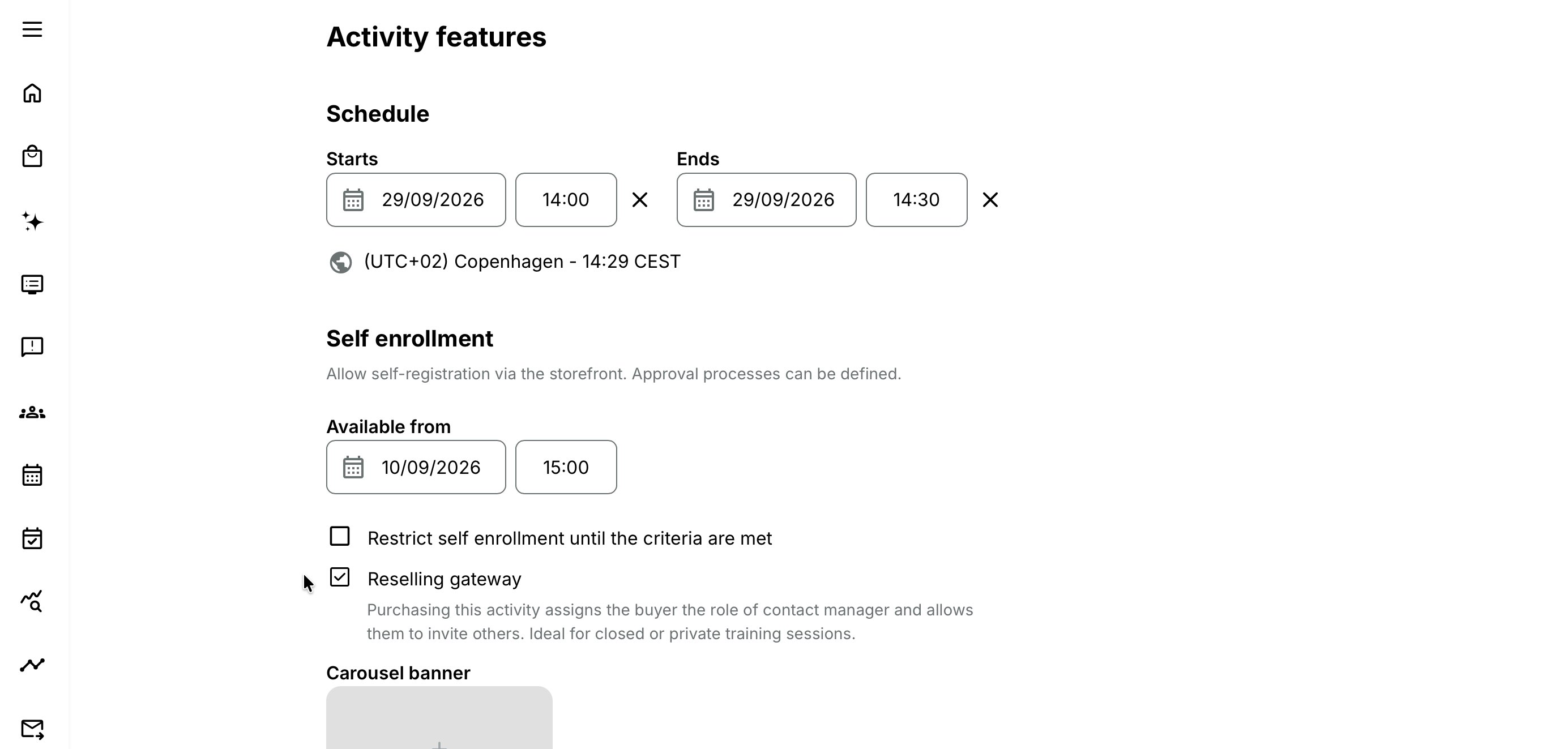
To configure the original activity:
- Create the Training Activity that will serve as the reusable offer.
- Configure its modules, completion requirements, features, settings and Activity Description. Ensure that the description clearly explains what is being purchased or requested, what the private delivery includes and what the initiator can expect after completing the process.
- Under Activity features, enable Self enrollment.
- Within the Self enrollment configuration, select Reselling Gateway.
- For a paid offering, configure the price, currencies, tax treatment and available payment methods.
- Where participation can be free, centrally funded or settled outside Eurekos, configure and test the appropriate zero-value or externally funded route. Confirm that the intended user can complete the process without being directed to an unnecessary payment step.
- When the initiator should be able to choose delivery dates, create the required events in Calendar and connect them to the original Training Activity. The connected events determine which dates can be presented during the Reselling Gateway journey.
- Configure the relevant enrollment, invitation and participant-facing emails. Include clear information for the initiator in their role as Contact Manager, particularly where they will invite or manage participants after the private delivery has been created.
- Confirm the intended organization and Storefront visibility, then save and publish the original activity in the appropriate Storefront.
- Complete a controlled test enrollment or checkout using a participant who is not already a Contact Manager. This ensures that the complete initiation and role-assignment journey is tested.
- Test every route that will be offered, including paid, free, discounted and externally funded participation where applicable.
- Validate the resulting private activity and confirm that:
- A separate private delivery has been created.
- The initiating signup and Transaction are connected to the new activity.
- The initiator has become the Contact Manager.
- The expected learning structure and participant information are available.
- Selected Calendar events and delivery details are connected correctly.
- Invitations and emails contain the expected information.
- An incomplete process does not leave an unintended empty activity behind.
Creating an Event module inside a learning path does not replace the Calendar configuration in step 7. The Event dates section of the Reselling Gateway enrollment process depends on separately created Calendar events connected to the original Training Activity.
Before publishing, review the original activity as a reusable delivery template:
- Activity and Course descriptions
- Module structure and completion requirements
- Certificates, questionnaires and workflows
- Organization and Storefront visibility
- Registration Details and capacity
- Booking preferences and Additional Products
- Prices, currencies, tax and payment methods
- Free or externally funded participation routes
- Connected Calendar events, time zones and video-conference configuration
- Activity-level administrators and instructors
- Participant, invitation and Contact Manager email content
A configuration issue in the original activity can be reproduced in every later private delivery. Changes to the original activity govern future initiations but do not automatically revise private activities that have already been created.
Activity Description before initiation
An initiator opens the original Training Activity in the Storefront to start a private group delivery.
For a learning path using Reselling Gateway, the Activity Description intentionally does not show Modules in this path. The original activity is a reusable program template, and displaying its Calendar Event dates could incorrectly suggest that the private delivery already has a fixed schedule.
Instead, the initiator selects the dates, times, and time zone for the required meetings during enrollment. The resulting private delivery therefore presents the schedule chosen specifically for that group.
The page must still make the program and process understandable.
Explain:
- The learning outcomes and intended group
- The included delivery and expected preparation
- What the initiator can schedule or coordinate
- Whether participation is paid, free, centrally funded, reimbursed, or handled later
- Price and tax where applicable
- What happens after enrollment or checkout
- That the initiator will invite participants into a private copy
- Whether invited participants must complete their own payment
- Who will configure the final webinar link, instructor, location, or other operational details
- Cancellation, funding, reimbursement, and support terms where applicable
Initiator enrollment and connected Calendar events
The initiator selects Enroll on the original Training Activity and continues through the configured enrollment or checkout route.
When Calendar events created in Calendar are connected to the original activity, the enrollment process includes an Event dates section. The connected events provide the reusable meeting content, including their titles, agendas or descriptions, and attachments. Their original dates, times, durations, and intervals are not retained.
The initiator must schedule every connected event. With the standard configuration, each event initially shows:
- Today’s date
- A start time rounded to the next 30-minute interval
- An end time 30 minutes after the proposed start
- The time zone from the initiator’s profile
These values are starting points only. If the original activity contained three meetings one month apart, the checkout does not reproduce that spacing: all three initially use the standard current-date and time values until the initiator changes them.
The date fields maintain a valid range. If Start is moved later than End, End is moved to match Start. If End is moved earlier than Start, Start is moved to match End.
Eurekos Support can configure the time intervals available in the picker—such as 5, 10, 15, or 30 minutes—and a separate standard duration for new Calendar events. When no separate duration is configured, the proposed duration follows the time-picker interval.
If the original Training Activity has no connected Calendar events, the Event dates section is absent. Event modules inside the learning path do not create this section and are not a substitute for connected Calendar events.
Before completing enrollment or checkout, the initiator should verify every event’s date, time, duration, and time zone. Date validation does not confirm instructor, room, equipment, travel, or service availability; these must still be coordinated through the provider’s normal process.
What happens after successful enrollment or checkout
After the configured enrollment or checkout reaches confirmation, Eurekos performs the private-delivery setup.
Confirmation
The confirmation tells the initiator that enrollment was completed, a confirmation email was sent, and they can now invite others.
Standard enrollment emails are sent together with the Invite clients email used by the Reselling Gateway flow.
The confirmation may represent:
- A completed paid checkout
- A free enrollment
- A zero-value Transaction
- A centrally funded participation route
- The Eurekos part of a financial process completed elsewhere or later
Private clone
Eurekos creates a clone containing the original Activity Description title, features, and settings, except that Self enrollment is disabled.
The clone is therefore:
- Unavailable as a normal public or Storefront self-enrollment offer
- Available to invited users through the controlled invitation route
- Marked as a Reselling Gateway clone
- Linked by reference to its parent or original activity
Treat the clone as independent operational data after creation. Do not assume that later changes to the original will update existing clones.
Calendar events
For every Calendar event connected to the original activity, Eurekos creates a corresponding Calendar event in the private clone. Its reusable event content is carried into the new event, while its date, time, and time zone come from the values selected during enrollment or checkout.
This concerns Calendar events created in Calendar and connected to the Training Activity—not Event modules in the learning path.
Video-conference links are not carried into the private Calendar events. The provider or an authorized group lead must configure the correct private conferencing details before invitations and delivery.
Initiator and Transaction
The initiator is enrolled in the cloned activity and is shown only in that clone’s participant list. The associated Transaction is also transferred to the clone.
The Transaction may represent a monetary purchase or a zero-value enrollment. Review the amount, payment method, status, invoice information, and any external financial records before interpreting it as evidence of payment.
The initiator’s profile is marked as Contact Manager, and the initiator receives access to Invitations, where the private activity appears.
The Invitations list and invitation details do not provide the normal Preview training action for this private delivery. Do not treat its absence as a permission defect.
Original activity after initiation
The original Training Activity remains available in the Storefront and can be used repeatedly to start new private deliveries.
Each successfully completed Reselling Gateway initiation creates a separate private delivery:
Original reusable offer → Group A private delivery
Original reusable offer → Group B private delivery
Original reusable offer → Group C private delivery
Each private delivery has its own initiator, Transaction, dates, invitations, participants, and administration. Changes or activity in one delivery do not automatically affect the others.
This creates a one-template-to-many-deliveries model. Use stable customer references, organization relationships, and reporting conventions so administrators can distinguish private deliveries that share the same Activity Description title.
Group lead invitation flow
After the clone is created, the group lead opens Invitations and invites the intended participants.
Invitation emails include a See training link. The invitation is the controlled enrollment route into a clone whose Self enrollment is disabled.
Depending on the program design, invited participants may:
- Join without payment
- Complete their own payment
- Use an organization-funded route
- Follow an invoice or reimbursement process
- Participate under another approved funding arrangement
Existing authenticated invitee
An invited authenticated user opens the Activity Description, sees Enroll, and can proceed through the supported enrollment or checkout process even though Self enrollment is disabled on the clone.
Invited person without an account
The person opens the invitation and selects Enroll, then continues to login or account creation.
- If they register using the same email address that received an Email or File invitation, Eurekos recognizes the invitation and sends them to the appropriate enrollment or checkout route.
- If they register using a different email address, the invitation cannot be matched. They return to the Activity Description with Not available in storefront and cannot enroll through that route.
This matching protects the private invitation. Tell invitees to use the exact invited email address.
If a person without an account opens an invitation link that has already been used, Eurekos can show You don’t have permissions to access this page.
Person who was not invited
Someone who obtains the URL but was not invited reaches an unavailable Activity Description and cannot enroll.
The URL does not make the private clone public.
Contact Manager implications
The initiator becomes a Contact Manager when the private delivery is successfully created. This enables the invitation workflow, but it can also affect other active Promotions because Contact Managers are added to active Promotions.
Before broad use, decide whether an automatically assigned Contact Manager should receive unrelated active campaigns.
Review Promotion scope and lifecycle so a customer, partner, facilitator, or local group lead does not receive material intended for another audience.
The Contact Manager value remains a profile attribute after the immediate private-delivery setup unless an authorized administrator changes it through the approved process.
For more detail, see Introduction to Invitations and Promotions.
Optional group-lead editing of connected Calendar events
The platform option Allow to edit Events can permit the initiator, despite having the Participant role, to edit Calendar events connected to the Reselling Gateway activity they initiated.
The setting concerns connected Calendar events. It does not grant permission to edit Event modules or the wider learning-path structure. When Reselling Gateway is activated, confirm with Eurekos support whether group leads should receive this additional permission.
The available editing scope can include:
- Dates, times, time zone, and other details supported by the Calendar form
- Enable attendance marking
- Allow participants to cancel participation
- Video-conference settings
Enable this only when group leads are expected to coordinate their own private sessions. It gives a participant-role user operational influence over scheduling, attendance, cancellation, and conferencing for the connected Calendar events.
If it is disabled, internal administrators must complete those tasks.
In either case, document who owns:
- Final dates and time zone
- Instructor and location
- Private webinar creation and host access
- Invitations
- Attendance
- Participant cancellation
- Changes and notifications
Manager and Immediate Manager initiation
Manager and Immediate Manager users can start a Reselling Gateway activity only for themselves, not on behalf of another person.
After completing the process personally, they become the initiator in the clone and can invite others through the Contact Manager process.
Do not use a manager’s normal enroll-for-staff action to substitute another initiator into the Reselling Gateway flow.
This rule applies whether the activity is paid, free, centrally funded, or settled through another process.
Incomplete or cancelled enrollment or checkout
When an initiator starts the Reselling Gateway enrollment or checkout process, Eurekos can create a temporary private clone while the signup and selected configuration are being connected.
If the initiator completes the process, they become the first signup in the clone. The clone is then an active private delivery and is not considered empty or orphaned.
If the initiator leaves or cancels before their signup is connected:
- The intended enrollment or checkout is not completed.
- The initiator does not become an active participant in the private delivery.
- The temporary clone can remain without signups.
- The empty clone becomes eligible for scheduled cleanup after the configured period.
The presence of a temporary clone therefore does not prove that enrollment or payment was completed. Verify the initiator signup, Transaction status, and enrollment confirmation before treating it as an active private delivery.
If an invited participant later cancels their enrollment in an existing clone, that cancellation must not by itself delete the clone. The group lead’s delivery and any other signups continue to exist independently.
Automatic cleanup of empty clones
A scheduled cleanup process removes an empty clone only when all of the following conditions are true:
- It was created through the Reselling Gateway flow.
- It has no signups.
- The configured period since clone creation has passed.
The cleanup check runs every 24 hours. This does not mean that every empty clone is removed exactly 24 hours after creation. The clone must first reach the configured age and then be identified by the next scheduled check.
This process removes abandoned private copies without affecting deliveries where the initiator or another participant has completed enrollment.
Do not rely on automatic cleanup to correct a clone that already contains valid signups or Transactions. Investigate and resolve those cases through the appropriate enrollment, support, or financial process.
Transactions and finance
Every enrollment produces a Transaction record, including free enrollment where applicable.
In Reselling Gateway, the initiator’s Transaction is transferred to the clone. The record may represent a paid purchase, a zero-value enrollment, or the platform-side record for a delivery funded or settled through another process.
Do not interpret the existence of a Transaction as proof of monetary collection. Use the Transaction amount, payment method, status, invoice information, and any applicable external financial records to determine how the delivery was funded.
When administrators cannot find the Transaction under the original:
- Open the original Training Activity.
- Identify its generated Reselling Gateway clone.
- Open the clone’s participants and Transactions.
- Search using Transaction, order, user, and provider references.
- Confirm whether the enrollment or checkout reached confirmation.
- Determine whether the Transaction is paid, zero-value, pending, invoiced, or associated with an external funding process.
Keep the relationship among the original, clone, initiator, signup, Transaction, and any payment-provider or external financial record in every reconciliation procedure.
Refund, cancellation, reimbursement, and correction decisions must consider both the financial and learning state.
Cancelling or refunding a payment does not automatically define what should happen to the private activity or its invited participants. Likewise, a free or externally funded delivery can still require cancellation and audit procedures.
Identify a Reselling Gateway clone and its original activity
A Training Activity created through Reselling Gateway is marked on its activity page with Reselling gateway, followed by the title of the original Training Activity.
The original activity title is a link. Select it to open the reusable activity from which the private delivery was created. This allows an administrator to review the source configuration or make changes intended for future private deliveries.
The original title can also be entered in the Activities list search. Because the original and its clones can share the same Activity Description title, the search may return several matching activities. Open an activity and check for the Reselling gateway marker and linked original title to confirm that it is a clone.
For a completed initiation, the clone can also be recognized by the following characteristics:
- Self enrollment is disabled.
- The initiator appears in the clone’s participant list.
- The initiator’s Transaction is connected to the clone.
- Additional participants enter through the controlled invitation route.
Treat the original and each clone as separate operational records. Changes to the original support future initiations but do not automatically update private deliveries that have already been created. Make changes directly to an existing clone only when they are intended for that specific group.
Change management for clones
After creation, treat every clone as a real group or customer delivery. In every aspect it is.
Before changing either the original or a clone, determine:
- Whether the change is for future initiations or one existing group
- Whether existing clones must be amended individually
- Whether participants or the group lead must be notified
- Whether dates, conferencing, capacity, certificates, automation, and completion remain valid
- Whether the funding or reimbursement model is affected
- Whether the change affects Transaction, contractual, accreditation, or regulatory evidence
Do not apply a change to private deliveries without reviewing participant progress and any commitments made to the affected groups.
Realistic use cases
| Use case | Design and operation | Outcome and funding model |
|---|---|---|
| Locally managed professional-development group | A professional association maintains a standardized development or improvement program. Local facilitators start private groups, invite members, coordinate the required meetings, and support completion. | The association retains central reporting and certification without creating and administering every group. Participation may be free, centrally funded, paid individually, invoiced, or reimbursed after completion. |
| Private virtual workshop | Publish the original offer with the required Calendar events created in Calendar and connected to the Training Activity. The initiator selects the dates and time zone during enrollment. After the clone is created, configure the private webinar link on the corresponding Calendar event before the group lead invites participants. | Each group receives its own schedule and conferencing details. Initiation and participant enrollment can be paid or free according to the program design. |
| Customer-managed classroom cohort | Create a standard classroom template and connect the required Calendar events. Enable group-lead editing of connected Calendar events when policy permits. The customer-side coordinator manages invitations and the permitted Calendar settings, while the provider confirms the instructor, room, equipment, and attendance responsibilities. | The customer can coordinate the local delivery while the provider retains program oversight. The customer may fund the cohort centrally, participants may pay individually, or participation may be provided without a direct charge. |
| Repeated partner deliveries | Keep one governed original activity in the Storefront. Each partner initiation creates a separate clone and Transaction record. Use naming, organization relationships, and reporting conventions to distinguish the private deliveries. | Many partners can use the same governed program without sharing participants, dates, or administration. The commercial arrangement can vary by partner without changing the private-clone model. |
| Group lead starts a team delivery | The group lead completes the configured enrollment or checkout for themselves, becomes Contact Manager in the clone, and then invites the team. The group lead must not use the normal enroll-for-staff action to appoint another person as the Reselling Gateway initiator. | Participation can be free, centrally funded, paid individually, invoiced, or handled through another approved financial process. |
| Quality-improvement program with reimbursement | A professional body maintains one governed improvement program for many independent groups. A local facilitator starts a private delivery, invites colleagues, coordinates meetings, and guides the group through reflection, assessment, and documented improvement. | Completion evidence or certificates can support an external reimbursement or accreditation process. Eurekos manages the learning workflow and evidence without necessarily collecting or processing the reimbursed amount. |
Verify the configuration
Use representative accounts and the routes enabled for your delivery. Check the relevant outcomes before launch and after a material change; an administrator preview alone does not verify the participant experience.
| Scenario or check | Expected result or evidence |
|---|---|
| Initiator and private delivery | Complete the intended free, paid, or externally funded route. Confirm the private clone, linked original, initiator’s first signup, Contact Manager role, and corresponding Transaction. Also test an abandoned initiation against the configured empty-clone process. |
| Connected Calendar events | Where used, verify the date picker, time zone, corresponding cloned Calendar events, and permitted later changes. Configure new private webinar links where copied links are cleared; distinguish these events from Event modules. |
| Invitation identity | Test an existing invitee, a new user with the invited email, another email, an uninvited holder of the URL, and a used link. Verify the intended invitation, cancellation, and group-lead permissions. |
| Invitee enrollment and payment | Each invitee follows the configured enrollment route and, where applicable, their own payment process. Confirm invitation and enrollment messages, capacity, participant status, and absence of unintended Preview access. |
| Delivery readiness | Finalize dates, webinar, instructor, Location, and Equipment. Group-lead and provider responsibilities are clear, and financial references reconcile to the clone rather than the original offer. |
| Completion and exceptions | Verify central reporting, attendance, certificates, and any evidence needed for external reimbursement. Handle refund, cancellation, Contact Manager scope, Promotions, and retention through the appropriate process; active deliveries are not treated as empty clones. |
Troubleshooting
| Problem | What to check |
|---|---|
| Reselling Gateway is missing | Confirm it is enabled in the Activities Promote configuration. Verify that Self enrollment is enabled and that the editor has activity permission. |
| Modules in this path is missing before initiation | This is expected on the Reselling Gateway Activity Description for a learning path. Ensure the remaining description explains the offer adequately. |
| Event dates are missing from enrollment or checkout | Confirm that Calendar events created in Calendar are connected to the original Training Activity. Event modules inside the learning path do not create the Event dates section. |
| Start or End changes automatically | This is expected. The date fields synchronize so End cannot be earlier than Start. Enter the intended complete range and time zone. |
| The selected dates conflict with an instructor or venue | Date validation does not guarantee operational availability. Review Availability and confirm the delivery through the provider’s process. |
| The completed private delivery does not appear | Confirm that the enrollment or checkout reached successful confirmation and that the initiator’s signup was connected to the clone. A temporary empty clone does not prove that the process completed. |
| A temporary empty clone exists after an abandoned process | This can occur when a clone is created while enrollment is being configured but the initiator does not complete the process. Confirm that it has no signups and allow the scheduled cleanup process to evaluate it after the configured period. |
| A free initiation did not create an active private delivery | Confirm that the person completed the supported Reselling Gateway enrollment route and reached confirmation. A zero price does not remove the need to complete the process. |
| The initiator is missing from the original participant list | This is expected after success. The initiator appears in the clone rather than the original. |
| The Transaction is missing from the original | Search the Reselling Gateway clone. The Transaction is connected to the clone with the initiator. |
| The Transaction has an amount of zero | This can be expected for a free or fully funded enrollment. Confirm the intended funding model and do not interpret a zero-value Transaction as an error by itself. |
| The provider expected payment but the Transaction is zero | Review the original activity price, currency, discounts, subscriptions, funding route, payment method, and the exact participant context used during initiation. |
| The clone has no public enrollment | This is expected. Self enrollment is disabled on the clone. Use the Invitations route. |
| The private webinar link is blank | This is expected. Video-conference links from the original connected Calendar events are cleared. Configure the private link on the corresponding Calendar event in the clone. |
| The group lead cannot preview from Invitations | This is expected. Preview actions are not available on the Reselling Gateway Invitations pages. |
| A newly registered invitee cannot enroll | Verify that the person registered using the exact email address used for the invitation and opened the current invitation link. |
| The invitation link says no permission | It may have been used already, belong to another email address, or lack a valid invitation context. Check the invitation status and resend when appropriate. |
| A non-invited user sees Not available in storefront | This is expected. The clone is private and does not allow ordinary Self enrollment. |
| The group lead cannot edit a connected Calendar event | Check the Allow to edit Events setting, initiator identity, cloned-activity relationship, and Participant or Contact Manager permissions. This permission concerns Calendar events, not Event modules. |
| A group lead receives unrelated Promotions | Contact Managers are added to active Promotions. Review active campaigns, recipient scope, and whether the profile extension should remain. |
| An empty clone disappeared | Check whether it was a Reselling Gateway clone with no signups and had exceeded the configured cleanup period. If so, scheduled removal is expected. Review the Transaction and enrollment state before escalating. |
| An invited cancellation was followed by clone loss | This is not intended when valid signups remain. Preserve the evidence, verify the remaining signups, review cleanup timing and logs, and escalate. |
| Manager initiation for another employee is unavailable | This is expected. Manager and Immediate Manager users must initiate the activity for themselves and then invite others. |
| Participants expected individual payment but no payment appears | Review the clone’s price, invitation route, participant checkout, discounts, funding model, and Transaction status. Do not assume that the initiator’s original Transaction covers invited participants. |
| Reimbursement has not been received | Eurekos can provide completion and certificate evidence, but an external reimbursement process remains outside the learning-completion workflow. Confirm the responsible organization and its required documentation. |
| Support needs evidence | Record the original and clone IDs, linked parent activity, initiator and invited email addresses, Transaction, order and provider IDs, amount, payment status, funding model, checkout result, dates and time zone selected for connected Calendar events, Contact Manager state, invitation status, feature permissions, cleanup timing, mail logs, and expected versus actual result. |
FAQ
-
Does Reselling Gateway require a paid activity?
No. A private delivery can be initiated through a paid, free, zero-value, centrally funded, invoiced, reimbursed, or externally settled process.
The required enrollment or checkout route must still be completed so Eurekos can create the clone and its records.
-
Does the initiator enroll in the original activity?
Not as the final participant record. After successful completion of the process, the initiator and Transaction are transferred to the generated clone and appear there.
-
Can the original be used more than once?
Yes. It remains the reusable Storefront offer, and each successfully completed Reselling Gateway initiation creates another private clone.
-
Is the clone visible in the Storefront?
Not through normal Self enrollment. The clone has Self enrollment disabled and is accessed through invitations.
-
Can someone enroll if they obtain the clone URL?
Not without a valid invitation context. A person who was not invited sees that the activity is unavailable. This is defined by email.
-
Why must a new user register with the invited email?
The email address connects the new account to the private invitation. A different address cannot claim that invitation.
-
Are original webinar links copied to the private delivery?
No. Video-conference links in the cloned Calendar events are cleared and must be configured for the private session.
-
Can a Manager start the delivery for an employee?
No. Manager and Immediate Manager users start the Reselling Gateway activity for themselves and then invite other participants through the clone.
-
Why is Preview training missing from Invitations?
This is expected for a Reselling Gateway activity. The Invitations list and invitation details do not provide that preview action.
-
Does a Transaction mean that payment was collected?
No. Eurekos creates Transaction records for enrollment, including zero-value enrollment where applicable.
Review the amount, payment method, status, invoice, and external financial records before concluding that money was collected.
-
Can completion evidence support an external reimbursement process?
Yes. A certificate or other completion evidence can document that the participant met the program requirements accompanied by the confirmation of purchase. The external organization remains responsible for deciding and processing reimbursement.