Courses in a Training Activity - Article
Summary
A Course provides reusable digital learning, while a Training Activity turns that learning into something people can join and complete. By placing a Course in one or more Training Activities, the same content can support different audiences, programs, schedules, and commercial offerings without being recreated. Each activity can deliver the Course as part of its own participant journey while the underlying learning content remains centrally maintained.
In this article you will learn:
- How a Course differs from a Course module and a Training Activity
- How to find and add an existing Course
- Why the same Course cannot be added twice to one activity
- Which decisions belong in Content Authoring, at module level, and at activity level
- How single-Course activities differ from multi-module learning paths
- How schedules, responsibility, location, equipment, certificates, feedback, restrictions, completion, and recertification apply
- What Course reuse means for maintenance and reporting
- How to test and troubleshoot a Course-based delivery
Understand Course, module, and activity
These three objects have different purposes:
| Object | What it represents | Examples of what belongs there |
|---|---|---|
| Course | Reusable learning content created in Content Authoring | Pages, video, H5P interactions, tests, navigation, page restrictions, Course Description |
| Course module | One Course placed in a particular Training Activity | Its position, Schedule, responsible instructor, location, certificate, questionnaire, access and completion behavior |
| Training Activity | The complete delivery and signup container | Participants, Storefront offer, registration, approval, capacity, activity certificate, commerce, organization visibility, communication |
A participant enrolls in the Training Activity and receives its modules. They do not enroll in an abstract Course independently of delivery context.
This separation lets one Course support, for example:
- A free public self-paced offer
- A private customer onboarding activity
- A scheduled blended program
- An internal mandatory program
- A paid certification delivery
Each activity can have its own participants and business settings while using the same learning content.
Decide whether a Course module is the right component
Use a Course module for structured digital content whose progress and completion Eurekos should track. Use a different module type when the component is primarily:
- A live or calendar-based session: Event
- Work uploaded or assessed by an instructor: Assignment
- A choice among separately managed Training Activities: Existing Training
A blended learning path can combine all of them.
This article explains how to use an existing Course in an activity. Creating pages, tests, media, translations, and navigation belongs in the Content Authoring documentation.
Add a Course module
- Open Course Administration → Activities.
- Create a new Training Activity or edit an existing one.
- Add a module and select Course.
- Find the Course by its title or Course code.
- Select the intended Course.
- Add the module-level features required for this delivery.
- Place the module in the intended order.
- Save the activity.
- Review the activity, Activity Description, and participant journey before enrollment opens.
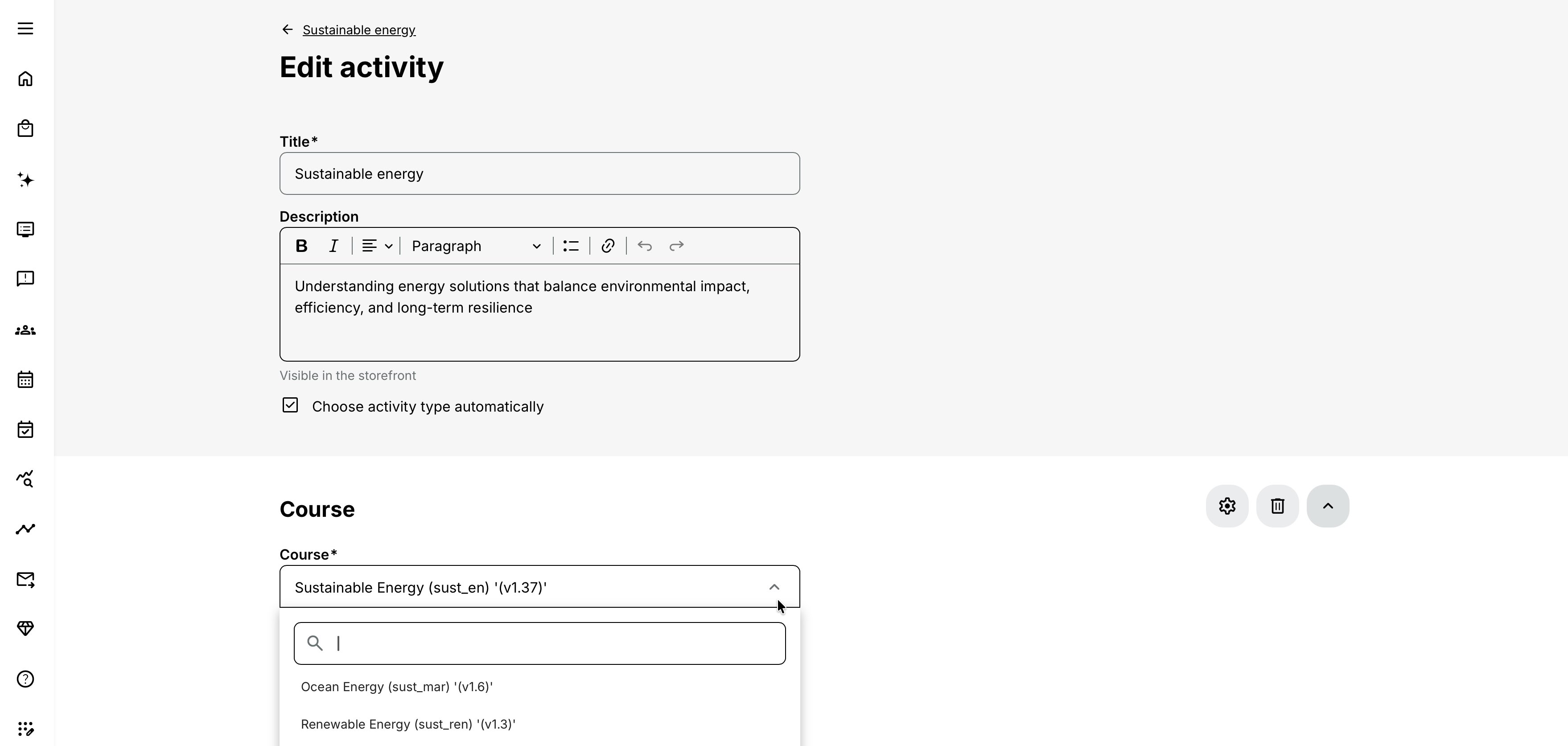
The Course selector works in one of two ways:
- On a platform with a smaller number of Courses, it can show the available options as a normal list.
- When the configured threshold is exceeded—more than 100 items by default—it becomes an autocomplete field and displays matching search results after you type.
Search supports both Course title and Course code. If no exact object matches, the list remains empty. A missing result is not necessarily a loading problem; check the title, code, access, and organization filters.
Do not add the same Course twice
Eurekos validates the activity structure and does not allow the same Course to be selected twice in one Training Activity. The same Course can still be reused in different Training Activities.
If the journey seems to require the same Course twice, first identify the real objective:
- For a reminder to revisit content, link or refer to the relevant page.
- For targeted revision, use Recommendations where appropriate.
- For a genuinely different learning stage, create a separate Course with its own purpose and completion.
- For a second attempt or renewal, configure attempts and recertification instead of duplicating the module.
- For multiple delivery dates of the same content, create or repeat separate activities and use Existing Training options where participants choose a date.
Duplicating a Course within one journey would make progress, completion, certificates, and reporting ambiguous, which is why the structure is prevented.
Add a participant-facing module description
The Course title identifies the selected content. A short module description can explain its purpose in this particular learning path, such as:
- Why participants must complete it
- What to prepare first
- How long they should expect to spend
- Whether it supports a later Event or Assignment
- What result is required to continue
Use this delivery-specific description without rewriting the reusable Course. Keep Course content instructions inside the Course itself.
Configure Course-module features
Module-level features apply only to this occurrence of the Course in this activity. Availability depends on platform configuration and other enabled features.
Schedule
Add a module Schedule when the Course should open, run, or be associated with a defined period. A scheduled Course module can also support instructor, location, and equipment availability checks and date-relative automation.
Module dates alone do not make the overall activity scheduled. Enable the activity-level Schedule feature whenever the activity should be treated and displayed as a scheduled delivery.
In a single-module activity, a blank enabled activity Schedule can derive its range from the Course module. In a multi-module activity, the overall range can be calculated from the earliest module start and latest module end, unless explicit activity boundaries are set.
For more detail, see Schedules for Training Activities and Modules.
Responsible instructor
Assign the person who facilitates or oversees this Course module. This is useful when different specialists own different parts of a learning path.
Activity-level Course administrators and instructors oversee the complete delivery. Module responsibility expresses who owns this specific component and can affect instructor dashboards, progress access, and module-related work.
For more detail, see Administrators, Instructors, and Followers.
Location and on-site delivery
A scheduled Course module can use a pre-created location. Use it where digital learning is facilitated in a classroom, lab, customer site, or other physical setting even though the module content is a Course.
Enable This is an on-site location when the instructor travels to the participant or customer location. Check instructor and venue availability against the module Schedule.
Location capacity describes the venue; activity-level Registration Details determine participant capacity.
Equipment
Equipment is available for a Course module when Schedule is enabled. Reserve the resources required for that delivery, such as a simulator, device set, or lab equipment.
Availability checks instructor, Location, and Equipment bookings against the module Schedule. Instructor and Location conflicts can produce an overridable warning; an Equipment conflict must be resolved before the module can be saved.
For more detail, see Availability, Equipment.
Certificate
Use a module-level certificate to recognize completion of this Course module.
For an activity with one module, certification normally belongs at module level. When an activity has two or more modules, an activity-level certificate can recognize completion of the entire learning path while individual modules can still issue their own certificates where needed.
Certificate issuance criteria and Course completion must agree. Test failure, incomplete content, manual completion changes, expiration, and recertification paths.
Questionnaire
Attach a module-level questionnaire when feedback concerns this Course specifically. Configure when it becomes available and whether completion is required for certification.
Use an activity-level questionnaire when the participant should evaluate the complete journey. A questionnaire used as an application or enrollment requirement belongs in the Self enrollment process instead.
For more detail, see Training Feedback, Introduction to Questionnaires and Common Use Cases.
Access Restrictions
Apply module-level Access Restrictions when a participant may enroll in the activity but should not open this Course until defined criteria are met.
Examples:
- Complete an earlier module first.
- Attend a safety briefing.
- Hold a required certificate or Skill.
- Wait until a date.
Ordering modules does not enforce sequence by itself. Access Restrictions create the lock. Self-enrollment requirements serve a different purpose: they stop the participant from entering the activity at all.
For more detail, see Self-enrollment Eligibility and Requirements, Access restrictions.
Completion behavior
Course completion normally follows the Course's tracked content and completion rules. Module-level Completion behavior can modify the participant experience, for example by requiring explicit confirmation or suppressing an inappropriate congratulation message.
Use overrides sparingly. A completion design should remain understandable in progress reporting, certification, adaptive paths, and later attempts.
Adaptive module
Use Adaptive module criteria when this Course should appear or be included only for participants who meet particular conditions. It can support a supplemental branch, an exemption, or a personalized route.
Adaptive visibility is not the same as a locked visible module. Access Restrictions keep a component present but unavailable until conditions are met; adaptive behavior can change whether the component forms part of that participant's path.
Automated Email Workflow
Attach module-level workflows when communication should relate to this particular Course and its dates, progress, or status. Use activity-level workflows for complete-delivery communication.
Review recipients and timing whenever a module Schedule, responsible person, or activity dates change.
Configure the complete activity separately
The Course module does not determine who can enroll or how the offer is administered. Configure these at activity level as required:
- Activity title, code, type, language, categories, and description
- Self enrollment and pre-enrollment requirements
- Participation Approval
- Registration Details, seats, and Waiting list
- Activity Schedule and availability
- Organization and Storefront audience
- Course administrators and instructors
- Community connection and Followers
- Activity-level certificate and questionnaire for a learning path
- Mandatory deadline and Access Expiration
- Pricing, tax, payment methods, and additional products
- Promotion, Focus, Priority, Ratings, and other enabled features
A Course can therefore remain unchanged while separate activities implement different business models.
Single-Course activity behavior
An activity with one Course module is the simplest reusable delivery. Several presentation and configuration details are specific to this structure:
- The Course can provide the main body of learning.
- A module-level certificate is used instead of a whole-path certificate.
- If the Course already has a Course Description, its title and widgets can supply the initial Activity Description.
- Widgets copied from the Course Description during creation are not kept synchronized with later Course Description changes.
- When the activity Schedule is enabled but left blank, its displayed range can derive from the module Schedule.
Always review the generated Activity Description. The enrollment decision needs delivery information—audience, dates, price, prerequisites, support, and expected outcome—that may not belong in the reusable Course Description.
Course modules in a learning path
Adding a second module turns the activity into a multi-component learning path. Module order controls presentation, but does not alone force sequence.
For each Course module, decide:
- Its purpose and position
- Whether it is required, supplemental, or adaptive
- Whether it has its own dates
- Whether access depends on earlier evidence
- Who is responsible
- Whether it issues a separate certificate
- Whether feedback is module-specific
- How it contributes to overall completion
At activity level, decide what completion of the entire path means and whether an activity certificate, overall questionnaire, Schedule, Mandatory deadline, or automation is required.
Reuse and maintenance implications
Reusing one Course avoids duplicate authoring, but it also means the underlying content is shared. A content change can affect every Training Activity using that Course.
Before changing a live Course, identify:
- Which active and future activities use it
- Whether participants are already in progress
- Whether completion rules, tests, or page restrictions are changing
- Whether translations and accessibility remain complete
- Whether certificates or prerequisites consume its result
- Whether the change requires participant or stakeholder communication
Delivery-specific module settings remain attached to the activity. Changing a Course's pages is different from replacing the Course selected in a module. Replacing the Course is a structural activity change and can also trigger a prompt to notify Followers.
Attempts and recertification
When activity recertification creates another attempt, Course-module settings determine whether earlier progress should be reused.
The Keep progress option, where available, carries previous Course progress—including certificates within the module block—into later activity attempts. This can let a new activity attempt complete with retained evidence, including an activity-level certificate when that Course supports its issuing criteria.
Use this only when the business requirement accepts previous learning as current. If participants must repeat the Course during every certification cycle, do not retain progress.
Access Restrictions can also be configured to be overridden on activity recertification for supported modules. Test first attempt, renewal attempt, retained progress, certificate issuance, and expiration as one end-to-end process.
Realistic use cases
| Use case | Configuration | Purpose or important consideration |
|---|---|---|
| Reusable product introduction | Author one Product Introduction Course and place it in separate Training Activities for employees, partners, and customers. | Give each activity its own Storefront audience, price, registration process, and Activity Description while reusing the same Course. |
| Blended safety program | Build a learning path containing a preparation Course, a live Event, and an assessed Assignment. Restrict the Event until the Course is complete. | Require the Assignment to be passed before issuing the activity certificate. |
| Facilitated digital workshop | Use one scheduled Course module with an instructor, classroom location, and equipment. | Participants work through the digital content together while the Training Activity controls capacity and communication. |
| Annual renewal | Use activity re-certification and decide whether Course progress should be retained. | If policy requires a fresh assessment every year, ensure the new attempt does not inherit evidence that must be repeated. |
Verify the configuration
Use representative accounts and the routes enabled for your delivery. Check the relevant outcomes before launch and after a material change; an administrator preview alone does not verify the participant experience.
| Scenario or check | Expected result or evidence |
|---|---|
| Course identity and reuse | Select the intended reusable Course and language. Its content, completion logic, accessibility, and description are ready, and ownership covers all activities that reuse it. |
| Learning route | Test a new participant from enrollment to completion, plus in-progress or failed outcomes where relevant. Module order, access restrictions, adaptive behavior, and participant confirmation agree. |
| Delivery and evidence | Schedules, instructors, Locations, and Equipment are appropriate. Feedback and module- or activity-level certificates occur at the intended point. |
| Participant and reporting views | Check desktop and mobile presentation and reports where the same Course appears in several activities. Activity-level enrollment, commerce, and communication remain configured separately. |
| New attempts and changes | Test re-certification and retained progress when used. After a content change, verify affected activities, existing progress, restrictions, certificates, automation, and Recommendations still refer to valid content. |
Troubleshooting
| Problem | What to check |
|---|---|
| The Course field is empty until I type | The selector is using autocomplete because the configured item threshold is exceeded. Search by title or Course code. |
| The expected Course is not found | Verify exact title/code, publication and access, organization filtering, permissions, and that the object is a Course. An empty result means no accessible match. |
| The Course field is disabled | With organization filtering, an administrator may not have access to the Course's organization. Review the user's content scope and role. |
| The form rejects a Course | Check whether the same Course is already selected elsewhere in this activity. It cannot be added twice. |
| Participants can open modules out of order | Ordering is presentational. Add and test module-level Access Restrictions. |
| The overall activity still says Self-paced | Enable activity-level Schedule. Module dates alone do not change the activity's overall delivery type. |
| The instructor, room, or equipment is double-booked | Check Availability against the Course module’s Schedule. Review and, where operationally valid, deliberately override an instructor or Location warning. An Equipment overlap must be resolved by selecting another resource or changing the Schedule. |
| Equipment is unavailable as a feature | Equipment for a Course module requires its Schedule feature. |
| The certificate is missing | Check whether it belongs at module or activity level, verify completion/issuing criteria, participant status, questionnaire requirements, expiration, and attempt. |
| The Course was completed elsewhere | Determine whether that completion is intentionally reusable in this activity and attempt. Review progress-sharing, attempts, and recertification configuration. |
| New content appears in several deliveries | The activities share the same Course. This is expected. Use change governance or a separate Course version if deliveries must diverge. |
| The Activity Description did not update after the Course Description changed | Copied single-Course description widgets are not synchronized after activity creation. Update the Activity Description directly. |
| A replaced Course did not behave like a simple content edit | Replacing the selected Course changes activity structure and can affect progress, certificates, restrictions, reports, and Followers. Review the complete activity and current signups. |
| A renewal is already complete | Check Keep progress and whether retained Course evidence satisfies activity certificate or completion criteria. |
| Support needs evidence | Collect activity ID, Course ID/code, module position, participant and attempt IDs, relevant features, expected and actual progress/status, and timestamps. Avoid unnecessary personal data. |
FAQ
-
Can I add the same Course to several Training Activities?
Yes. Course reuse is a central purpose of the model. Each activity can have its own participants and delivery configuration.
-
Can I add the same Course twice to one Training Activity?
No. The activity form prevents it. Use a separate Course, Recommendations, links, or attempt/recertification behavior according to the actual objective.
-
Why do I have to type before Courses appear?
When the platform contains more than the configured threshold—more than 100 by default—the selector uses autocomplete for performance. Search by Course title or Course code.
-
Does changing the activity change the Course content?
Module and activity settings configure delivery. Editing the Course in Content Authoring changes the reusable content and can affect every activity that uses it.
-
Does changing the Course change every activity's description?
Not automatically. In a single-Course activity, Course Description widgets can be copied to the Activity Description at creation, but later Course Description changes are not automatically transferred.
-
Does module order enforce completion order?
No. Use Access Restrictions when later content must remain locked until an earlier requirement is met.
-
Where should I add a certificate?
For a single-module activity, add it to the Course module. For a learning path, use an activity-level certificate for the complete journey and module-level certificates only for separately recognized components.
-
Can a Course module have a location?
Yes, when the Course module is scheduled. This supports facilitated or classroom use of digital Course content.
-
What is reported: the Course or the activity?
Both layers can contribute information. Activity reporting identifies the delivery and signup; module reporting identifies Course progress and completion. Use activity and module identifiers carefully when comparing deliveries that reuse the same Course.