On-demand Training Requests - Article
Summary
On-demand training gives people a way to request training when the date, location, format, or audience must be arranged before a delivery can be confirmed. It helps the responsible team capture and evaluate demand, discuss the participant’s needs, and decide whether to schedule or offer suitable training. Submitting a request expresses interest only—it does not enroll the person, reserve a seat, or confirm that the training will take place.
In this article you will learn:
- When to use On-demand instead of a scheduled or self-paced offer
- Which platform and activity settings must be enabled
- How Contact information and Questionnaire request forms differ
- What participants, anonymous visitors, managers, Partners, and trainers see
- How Schedule and signup status change the Activity Description
- Where request and confirmation emails are sent
- How On-demand activities behave inside Existing Training modules
- How to design, test, and troubleshoot the request-to-delivery process
What On-demand helps you achieve
Use On-demand when the exact date, place, audience, or scope must be agreed after a prospective participant contacts you.
Examples include:
- A customer asks for a private workshop at its own location.
- A manager requests training for a team and proposes suitable dates.
- A specialist session is arranged only when there is enough demand.
- A learner requests equipment-specific training and supplies technical details.
- A commercial team qualifies the request before creating a confirmed delivery.
The published activity describes the capability you can provide. The request form begins a conversation about the actual delivery.
Understand what a request does not do
Submitting an On-demand request does not automatically:
- Enroll the requester
- Create a Registered or Reserved signup
- Hold a seat
- Join a waiting list
- Create a paid order
- Trigger the Participation Approval workflow
- Add the requester to a Community
- Schedule a date, instructor, location, or equipment
- Create a new Training Activity
The request is emailed to the configured receiving address. Your team must evaluate it, respond, agree the delivery, and then use the appropriate activity, enrollment, and commerce processes.
This distinction should be stated on the Activity Description and in internal procedures. Avoid words such as booking confirmed unless a later process has actually confirmed it.
Decide whether On-demand is the right model
| Requirement | Recommended model |
|---|---|
| Participant can start immediately | Self-paced Training Activity with Self enrollment |
| Participant selects one published date | Repeated activities or Existing Training options |
| Participant applies for a published activity | Self enrollment with Participation Approval |
| Provider and requester must agree date, place, scope, or group | On-demand |
| Customer purchases rights to resell or administer a cloned delivery | Reselling Gateway |
On-demand can coexist with an activity's descriptive schedule, but its main purpose is a request rather than immediate enrollment.
Confirm platform prerequisites
The feature must first be enabled at platform level. A platform owner or implementation team should confirm that the required On-demand modules are active and that On-demand functionality is configured under Settings → Commerce → On-demand.
The receiving email address is configured in the same Commerce area. Do not publish requests until that mailbox:
- Is valid and monitored
- Has appropriate access controls
- Has an agreed response owner and response time
- Can handle any personal or sensitive information collected
- Has a backup owner during absence
Once platform configuration is active, On-demand becomes available as an activity-level feature.
Configure an On-demand activity
- Open Course Administration → Activities.
- Create or edit the Training Activity.
- Configure the modules and participant-facing Activity Description.
- Enable activity-level Self enrollment so the On-demand offer is available in the Storefront.
- Add or enable activity-level On-demand.
- Select the request form type:
- Contact information
- Questionnaire
- If Questionnaire is selected, choose the pre-created questionnaire.
- Configure Storefront placement, organization visibility, language, and other audience rules.
- Save the activity.
- Test the request, receiving email, and confirmation as each applicable user type.
Selecting None means the On-demand feature is ignored.
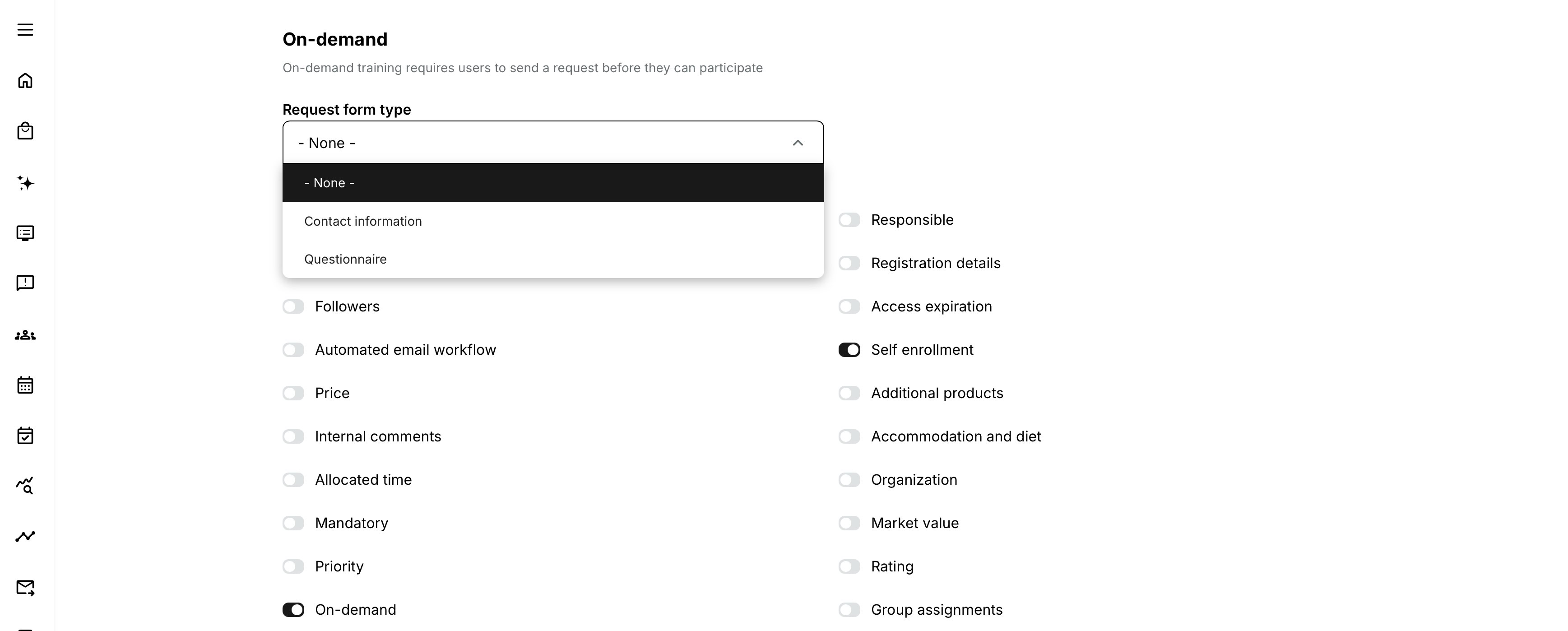
Self enrollment remains a prerequisite for Storefront availability
If On-demand is enabled while Self enrollment is disabled, the Activity Description shows Not available in the storefront rather than providing the normal request route. An already enrolled participant can still receive Go to training.
Choose the request form
Contact information
Choose Contact information for a standard request in which the requester supplies the personal and contact details available in the form.
This works well when:
- A coordinator only needs enough information to make contact.
- Delivery requirements will be clarified in a conversation.
- The same simple intake is suitable for every On-demand activity.
When the user selects Request training, Eurekos opens the request-training page. After submission, the answers are included in the email sent to the configured On-demand address.
Some platforms can include customer-specific additional fields. Treat those as local configuration and document them for your own support team.
Questionnaire
Choose Questionnaire when the request needs structured information beyond the standard contact form. They can be adjusted to provide exactly the right information for each request, and help you respond more efficiently.
Suitable questions can cover:
- Preferred dates or time periods
- Preferred place or delivery format
- Number and type of participants
- Business objective
- Existing knowledge or qualification
- Language
- Equipment or product details
- Accessibility, accommodation, or other service needs where appropriate and lawful
The questionnaire must already exist. When Request training is selected, the requester is taken to the questionnaire. After submission, Eurekos shows a success message and sends the answers to the configured On-demand address.
An anonymous visitor can submit an On-demand questionnaire. Design questions and privacy information accordingly: ask for the identity and contact details required to reply, but do not collect unnecessary data.
For more detail, see Training Feedback, Introduction to Questionnaires and Common Use Cases.
Build a useful request questionnaire
A good request form gathers enough information to route and qualify the request without making the prospect design the whole solution.
Recommended structure:
- Who is requesting? Name, organization, and reliable reply details.
- Who is the training for? Individual, team, customer group, and approximate number.
- What is the objective? The business or performance need.
- What delivery is preferred? Date range, time zone, format, place, and language.
- What constraints matter? Prerequisites, equipment, accessibility, or compliance.
- What should happen next? Preferred contact method and any deadline for a response.
Avoid collecting passwords, payment-card information, health details that are not necessary, or other high-risk data in a general email-based request process. Provide the appropriate privacy notice and retention process.
Activity Description behavior
When On-demand is correctly configured, the Activity Description shows:
- A short explanation that the training can be organized around individual needs
- Request training instead of Enroll
The button opens the selected Contact information form or Questionnaire.
The rest of the page should help the visitor decide whether requesting is worthwhile. Explain:
- What the training can achieve
- Intended audience and prerequisites
- Available delivery formats or regions
- What can be customized
- Which information the request form asks for
- What happens after submission
- Expected response time
- That submitting is not confirmation or enrollment
For more detail, see Activity Description.
Schedule and the Flexible label
An On-demand activity without a Schedule displays Flexible on the Activity Description. In this context, Flexible communicates that the delivery is not tied to a published date and can be organized around the request.
Use the page text to set realistic expectations about lead time, region, availability, and scheduling.
If a Schedule is added, review whether the offer is still truly On-demand. A broad availability period may be useful, but a fixed session that users can book usually belongs in the normal self-enrollment or date-selection model.
Button behavior by signup status
The activity's action depends on the viewer and signup state.
| Viewer state | Typical action |
|---|---|
| Not registered and allowed to access the On-demand offer | Request training |
| Registered in the activity | Go to training |
| Cancelled, Reserved, or Expired signup | Request training |
| On-demand enabled but Self enrollment disabled | Not available in the storefront |
| Already registered while Storefront request route is unavailable | Go to training |
Only Registered is treated as the active signup for replacing Request training with Go to training. A previous Cancelled, Reserved, or Expired record does not stop the user from sending another request.
The same person can submit multiple requests for one activity. Your receiving team should identify duplicates, follow-ups, and materially different requests rather than assuming one request per person.
Request and confirmation emails
After a request is submitted:
- Eurekos emails the answers from the Contact information form or Questionnaire to the address configured under Settings → Commerce → On-demand.
- Anonymous questionnaire requests are also sent to that address.
- A logged-in requester receives a confirmation email about the submitted request.
Before launch, verify:
- The From and reply behavior used on your platform
- The correct receiving address
- Spam filtering and allowlisting
- The subject and activity identification
- The answers and contact details needed to reply
- Language and branding
- Who receives anonymous submissions
- Data retention and secure handling
The email is the handoff into your operational process. If the mailbox is unattended, the feature can appear successful to the requester while no one acts on it.
Operational process after a request
Define a simple lifecycle outside the button itself:
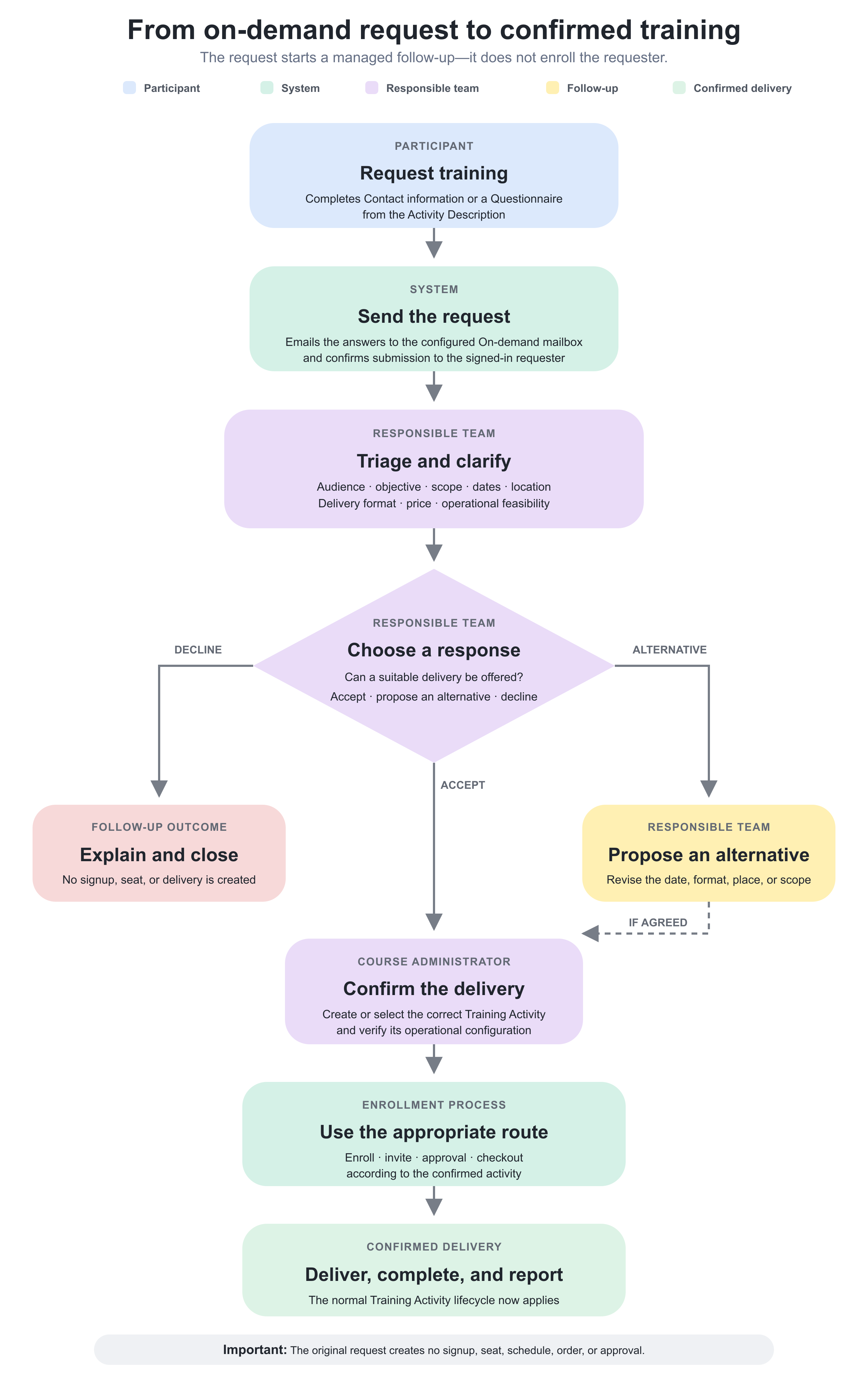
Record where request status and ownership are tracked. The On-demand email should not be mistaken for the complete case-management system.
If a confirmed delivery is created from a template or repeated activity, review organization targeting, dates, capacity, instructors, locations, equipment, price, tax, questionnaires, certificates, and communication before enrollment.
On-demand as an Existing Training option
An On-demand activity can appear as an option inside an Existing Training module. The option shows its On-demand nature and a request action. Selecting it leads to the Activity Description where the requester completes the configured form.
If the On-demand activity is the only option, the parent learning-path page can still present an Enroll action that redirects to the On-demand Activity Description to complete the request. This does not convert the request into immediate enrollment.
When mixing fixed and On-demand options, explain the distinction clearly. One option confirms or requests a published delivery; another begins a custom arrangement.
Realistic use cases
| Use case | Configuration | Purpose and considerations |
|---|---|---|
| Private customer workshop | Describe the workshop outcomes and available delivery formats. Target the appropriate customer or public audience, and use a Questionnaire to collect the preferred location, group size, dates, and objectives. Route submissions to the commercial training team. | Allows the team to understand the customer’s requirements and scope a suitable private delivery before confirming dates or enrollment. |
| Equipment-specific technical training | Use a structured Questionnaire to collect the equipment model, installation context, participant experience, and preferred delivery format. | Collect only the technical and contact information required to evaluate and arrange the delivery. Avoid unnecessary or sensitive information. |
| Manager request for a team | Explain that a Manager can submit a request for staff but that the request does not create signups. After agreeing on a date, the coordinator creates or selects the confirmed activity and enrolls the approved group. | Separates the initial team-training inquiry from the later activity configuration and participant-enrollment process. |
| Interest before scheduling | Publish an On-demand offer with a Flexibleschedule and a short Contact information form. Monitor incoming requests before deciding whether to create a scheduled delivery. | Helps measure demand before committing resources. Do not describe requests as a waiting list unless they are managed and communicated through an actual waiting-list process. |
Verify the configuration
Use representative accounts and the routes enabled for your delivery. Check the relevant outcomes before launch and after a material change; an administrator preview alone does not verify the participant experience.
| Scenario or check | Expected result or evidence |
|---|---|
| Request route | An intended signed-in user, permitted anonymous visitor, and relevant manager or partner can reach and submit the correct contact-information form or questionnaire. The page promises a request, not immediate enrollment. |
| Receipt and confirmation | The operational mailbox receives the request and the requester receives the correct language and branding. A monitored owner and backup can follow up. |
| Complete handoff | Take a request through qualification, scheduling, confirmation, and the separate enrollment process. Test Existing Training presentation where used. |
| Repeated or incomplete requests | The team can recognize duplicates, obtain missing information, and track response time without collecting or retaining unnecessary personal data. |
| Demand review | Review requested dates, regions, formats, and objectives to decide whether recurring demand should become a standard scheduled offer. |
Troubleshooting
| Problem | What to check |
|---|---|
| On-demand is missing from activity features | Confirm the required platform modules and Settings → Commerce → On-demand configuration are enabled, and verify edit permissions. |
| The page says Not available in the storefront | Enable Self enrollment and confirm Storefront, organization, audience, publication, and availability settings. On-demand alone does not publish the request route. |
| The page shows Enroll instead of Request training | Confirm On-demand is enabled, a request form type other than None is selected, and the saved Activity Description is the expected activity. |
| The Questionnaire field is disabled | The administrator may lack access to the selected questionnaire because of organization filtering. Review content scope and permissions. |
| The expected questionnaire is not selectable | Verify it exists, is accessible to the administrator, and the platform's questionnaire feature is enabled. |
| Anonymous submission cannot be completed | Check public Storefront access, organization targeting, questionnaire availability, required identity/contact questions, and browser/privacy constraints. |
| No request email arrives | Verify the Commerce On-demand recipient, spam quarantine, sending domain, platform mail service, and whether the form showed successful submission. |
| The logged-in user received no confirmation | Check the user's email, standard email configuration, language, sending logs, spam filtering, and account notification settings. |
| The team cannot reply to an anonymous requester | Ensure the questionnaire requires a valid contact method. Update the form without collecting unnecessary data. |
| The request created no participant | This is expected. Process the request and then enroll through the confirmed activity. |
| A fixed activity still says Flexible | Check whether a Schedule is actually enabled and saved. If the offer has a fixed bookable date, reconsider whether On-demand is the right feature. |
| An On-demand option behaves unexpectedly in a learning path | Open the child Activity Description directly, verify its request form and Self enrollment, then review the parent Existing Training setup and option filtering. |
| Support needs evidence | Collect activity ID, viewer role and signup status, request form type, entry URL, submission timestamp, receiving address configuration, email-log result, and expected versus actual behavior. Exclude unnecessary answer content. |
FAQ
-
Is an On-demand request an enrollment?
No. It sends request information to the configured team. Enrollment happens later through the appropriate confirmed activity and enrollment route.
-
Why is the activity marked Flexible?
An On-demand activity without a Schedule displays Flexible to show that it is not tied to a fixed published date.
-
Can an anonymous visitor request training?
Yes, when Questionnaire is used and the activity is available to the visitor. Include fields that allow the team to reply and provide suitable privacy information.
-
Can someone request the same training more than once?
Yes. Multiple requests for one activity can be submitted. The receiving team should manage duplicates and follow-ups.
-
Does On-demand use Participation Approval?
Not as the request mechanism. On-demand sends an inquiry. Participation Approval creates an enrollment request for a defined activity. A later confirmed delivery can use approval if needed.
-
Can the request reserve a preferred date or seat?
No. Dates, availability, capacity, price, and delivery must be confirmed separately.
-
Where are requests stored?
The request is sent by email to the address configured in Commerce settings. Email delivery does not provide case management, so establish a separate tracking process if the organization needs assigned ownership, request status, service levels, or an audit history.
When a questionnaire is used as the intake form, submitted responses are stored for both registered and anonymous users according to the questionnaire’s privacy configuration and are available through reporting.
A registered user’s response can be associated with their user profile. An anonymous response is also retained, but it is not connected to a registered user account. Include the necessary contact fields in the questionnaire if the responsible team must be able to identify and follow up with an anonymous requester.